

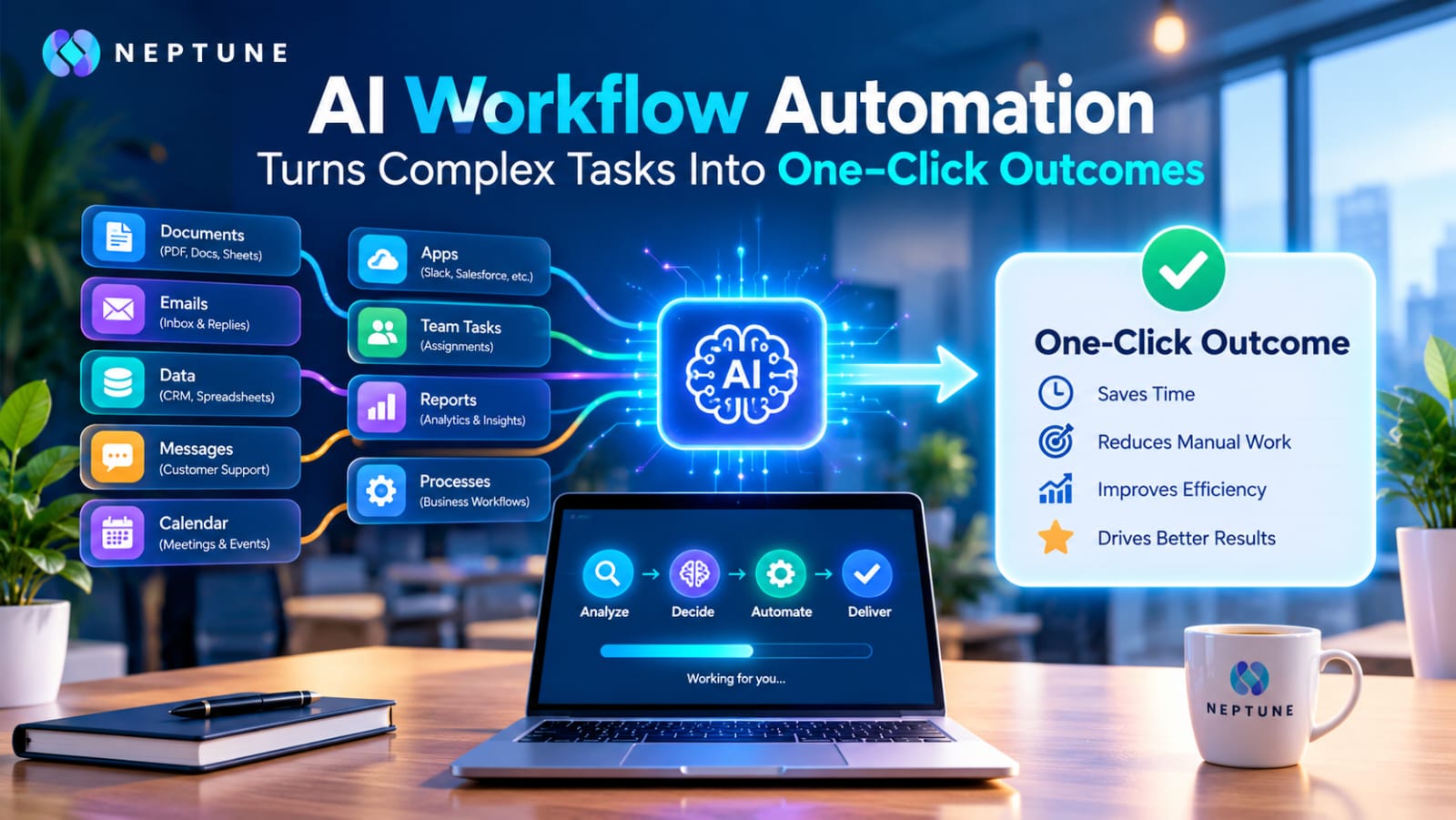
Imagine opening your laptop in the morning and finding that a process that normally takes your team two hours has already been completed. New leads have been researched, customer emails have been categorized, meeting notes have been converted into tasks, documents have been summarized, and the right people have received notifications. Nobody had to copy information from one application to another, repeatedly check spreadsheets, or manually decide what should happen next. That is the basic promise of AI workflow automation: turning a chain of complicated activities into a repeatable process that can begin with a single trigger or click. Unlike simple automation, modern AI workflows can work with information that is messy, unstructured, or difficult to interpret. IBM describes AI workflows as structured sequences in which AI can perform, coordinate, or enhance processes alongside human workers, while newer agent-based approaches can coordinate several connected processes with minimal intervention.
Table of Contents
- What AI Workflow Automation Really Means
- From Manual Tasks to Intelligent Workflows
- The Role of Triggers, Decisions, and Actions
- Why Traditional Automation Is No Longer Enough
- Rules-Based Automation vs. AI-Powered Automation
- How AI Connects the Entire Workflow
- Turning Unstructured Data Into Decisions
- The Anatomy of a One-Click AI Workflow
- Real-World Business Applications
- Sales and Lead Management
- Customer Support and Communication
- Content and Marketing Operations
- AI Workflow Automation in Finance and Operations
- Human Oversight and Smarter Approvals
- How to Build an AI Workflow Step by Step
- Choosing the Right Process
- Measuring ROI and Workflow Performance
- Common Mistakes to Avoid
- The Future of One-Click Business Operations
- Conclusion
- FAQs
What AI Workflow Automation Really Means
At its simplest, AI workflow automation combines artificial intelligence with workflow software.
The system receives information, interprets it, makes a decision, and initiates the next action.
| Traditional Automation | AI Workflow Automation |
| Follows fixed rules | Interprets information |
| Works with predictable data | Handles unstructured information |
| Moves information | Reads, classifies, and routes information |
| Requires predefined conditions | Can adapt to different inputs |
For example, basic automation may move every incoming email into a folder.
An AI-powered workflow can read the message, identify whether it is a sales inquiry or support request, extract important details, and route it correctly.
Common applications include:
- Email classification
- Invoice extraction
- Lead qualification
- Meeting-note generation
- Document analysis
AI does not need to replace the entire process. It can handle tasks that require reading, interpreting, classifying, summarizing, or generating information.
From Manual Tasks to Intelligent Workflows
Individual manual tasks may only take a few minutes.
But when employees repeat those tasks hundreds or thousands of times, the total cost becomes significant.
AI workflow automation connects these individual actions into one continuous process.
| Manual Work | Automated Workflow |
| Read an email | AI interprets the email |
| Update CRM | Workflow updates the record |
| Copy information | Data moves automatically |
| Create reminder | Follow-up is triggered |
This allows teams to spend more time on customer relationships, strategy, and decisions that require human judgment.
A typical workflow includes:
Trigger → AI Interpretation → Business Logic → Final Action
That is what makes the idea of a one-click outcome useful.
The Role of Triggers, Decisions, and Actions
Every effective AI workflow needs a clear beginning, decision layer, and outcome.
| Stage | What Happens |
| Trigger | Starts the workflow |
| Decision | AI interprets the information |
| Action | System performs the required task |
| Outcome | Business result is produced |
A trigger could be:
- New email
- Completed web form
- Uploaded document
- Calendar event
- CRM record
- Scheduled time
AI then interprets the incoming information and determines what it means within the workflow.
The system may then update a database, generate a document, send a notification, assign a task, or request human approval.
Good automation is not simply about pressing a button and expecting AI to understand everything.
Successful workflows need clear inputs, defined responsibilities, measurable outcomes, and appropriate boundaries.
Why Traditional Automation Is No Longer Enough
Traditional automation works well when information follows predictable rules.
For example:
Payment received → Update spreadsheet → Send notification
The challenge begins when information becomes less predictable.
Customers can describe the same problem in different ways. Invoices may have different layouts, while meeting transcripts may contain large amounts of information that need to become actionable tasks.
AI adds an interpretation layer that can process:
- Language
- Documents
- Images
- Unstructured information
This allows automation to handle situations that fixed rules may struggle with.
Rules-Based Automation vs. AI-Powered Automation
Consider a company that receives customer emails.
A traditional system might search for the word “invoice” and send the message to the finance department.
But a customer could instead write:
“I was charged twice for my latest purchase.”
The word “invoice” is not present, but the issue may still require financial attention.
An AI workflow can understand the meaning behind the message.
| Rules-Based Automation | AI-Powered Automation |
| Searches for keywords | Understands meaning |
| Uses fixed conditions | Interprets different wording |
| Works with predictable inputs | Handles varied inputs |
| Routes based on rules | Classifies and routes based on context |
AI can identify the duplicate-payment issue, extract relevant details, classify the request, and route it to the appropriate team.
This does not mean AI should make every decision without supervision.
Instead:
AI handles interpretation + Conventional software handles structured actions
The result is a hybrid system that combines flexibility with consistency.
How AI Connects the Entire Workflow
Businesses often rely on separate applications for:
- CRM
- Project management
- Documents
- Accounting
- Communication
Employees frequently become the connection between these systems.
AI workflow automation can turn those manual handoffs into a connected process.
Example
New Sales Inquiry
↓
AI Research
↓
CRM Record
↓
Lead Summary
↓
Salesperson Assignment
↓
Response Preparation
↓
Follow-Up Task
The individual tools do not need to disappear.
Instead, the workflow becomes the coordination layer that connects them and keeps information moving.
Turning Unstructured Data Into Decisions
Modern businesses generate large amounts of unstructured information.
| Unstructured Information | AI Can Turn It Into |
| Emails | Structured requests |
| PDFs | Extracted data |
| Meeting transcripts | Action items |
| Contracts | Relevant information |
| Customer messages | Classified requests |
| Reviews | Organized insights |
Consider an incoming invoice.
Instead of manually opening the PDF, finding the supplier, locating the invoice number, finding the total, and entering the information into accounting software, an AI workflow can extract these details automatically.
The same approach can be applied to sales conversations, support requests, application forms, and internal reports.
AI therefore acts as an interpretation layer between real-world information and structured business processes.
The Anatomy of a One-Click AI Workflow
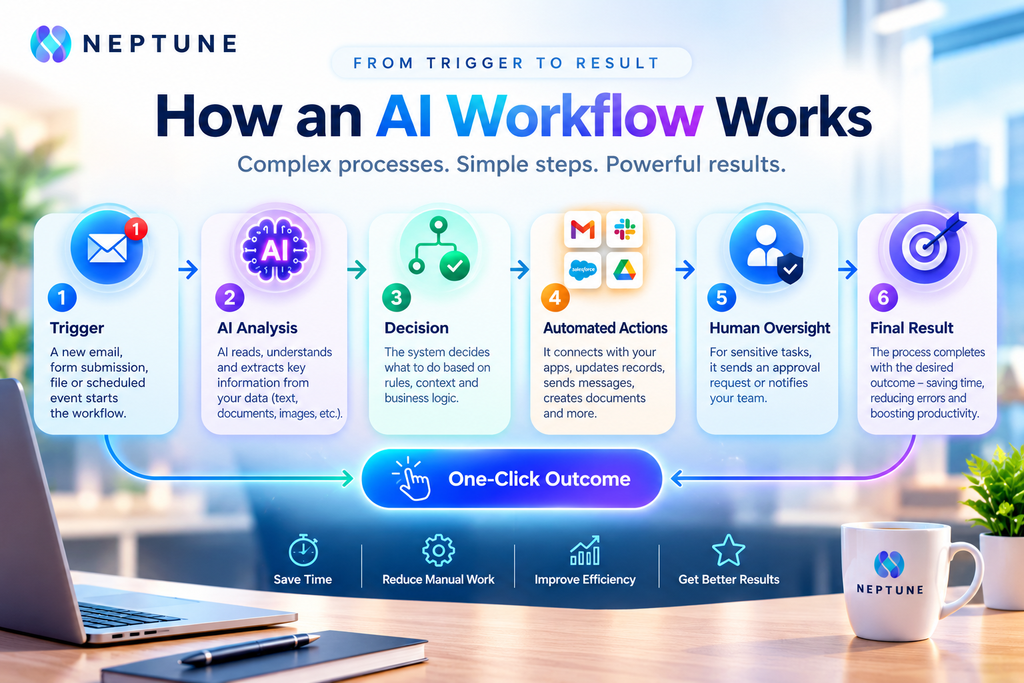
A well-designed one-click workflow may look simple to the user while performing many operations behind the scenes. Imagine pressing a button labeled “Process New Lead.”
Behind that button, the system could collect the lead, verify contact information, enrich the company record, analyze the request, classify the lead, generate a summary, update the CRM, prepare a response, notify the salesperson, and schedule a follow-up.
The user does not need to perform every step manually. The workflow engine coordinates the process in the background. In this way, complexity is not removed; it is moved into the workflow design so the final experience becomes much simpler.
Trigger, Process, Action, and Result
A practical AI workflow can be understood through four stages: trigger, process, action, and result.
The trigger tells the system when to start. The process uses AI and business logic to interpret information and determine what should happen. The action changes something in the outside world, such as sending a message, creating a record, generating a document, or assigning a task.
Finally, the result represents the measurable business outcome. This structure helps teams build workflows around specific goals rather than simply using AI because it is available. Useful measurements can include processing time, response time, accuracy, completion rate, throughput, and hours saved.
Real-World Business Applications
AI workflow automation can support a wide range of business functions.
| Business Area | Possible Applications |
| Sales | Lead research and qualification |
| Support | Request classification and summaries |
| Marketing | Content and campaign workflows |
| Finance | Invoice extraction and routing |
| HR | Application organization |
| Operations | Request monitoring and actions |
The most practical approach is usually to begin with one repetitive process.
Once its performance can be measured and improved, businesses can gradually expand automation to other areas.
Sales and Lead Management
Sales processes often contain several repetitive handoffs.
A new prospect may require:
Research → CRM Update → Lead Classification → Response → Follow-Up
AI can assist with many of these steps.
An AI workflow can analyze an incoming inquiry, identify the prospect’s company and requirements, summarize the opportunity, categorize the lead, update the CRM, and notify the appropriate salesperson.
It can also prepare a response draft for review.
Automation cannot guarantee that every lead becomes a customer.
Its role is to reduce administrative work and give sales teams more time for conversations and important decisions.
Customer Support and Communication
Customer support generates a constant stream of information, making it a natural area for AI workflow automation.
Instead of manually reading every incoming message, AI can classify requests and identify their basic intent.
| Step | Workflow |
| 1 | Receive customer message |
| 2 | Identify intent |
| 3 | Retrieve relevant information |
| 4 | Route to the right queue |
| 5 | Summarize conversation |
| 6 | Prepare response |
| 7 | Request human review when needed |
Straightforward requests may be handled automatically when the organization has approved that behavior.
More sensitive cases can be sent to a human agent for review.
Content and Marketing Operations
Marketing teams can turn repetitive content activities into structured workflows.
Starting with one approved content brief, an AI workflow could:
Content Brief → Audience Analysis → Outline → Draft → Social Variations → Email Summary → Metadata
The resulting assets can then move into the appropriate review process.
Human marketers remain responsible for:
- Strategy
- Originality
- Factual accuracy
- Brand voice
- Final approval
AI workflow automation should therefore be viewed as an operational accelerator, not a replacement for marketing expertise.
AI Workflow Automation in Finance and Operations
Finance and operations contain many repetitive processes that still require interpretation.
Common examples include:
- Invoices
- Purchase orders
- Expense reports
- Approval requests
- Internal documents
An AI workflow can:
Extract information → Check rules → Identify exceptions → Route to the right person
Employees no longer need to act as manual bridges between documents, spreadsheets, email, and business applications.
The same principle applies to operations.
A request arrives, AI identifies its category, the workflow checks the relevant conditions, and the appropriate action is triggered.
If the request falls outside the defined parameters, the workflow can stop and request human intervention.
Human Oversight and Smarter Approvals
The phrase “one-click outcome” should not be confused with “zero human involvement.”
Some low-risk administrative tasks may run automatically.
Other processes involving:
- Money
- Legal commitments
- Sensitive information
- Public communication
may require approval.
| Low-Risk Task | Higher-Risk Task |
| Routine classification | Financial decision |
| Internal notification | Legal commitment |
| Basic data entry | Sensitive information |
| Standard routing | Public communication |
Human checkpoints provide control over decisions that have greater consequences.
A well-designed workflow knows when to proceed and when to pause.
That pause is not a weakness. It is a deliberate control that allows businesses to automate predictable work while keeping people involved in important decisions.
The goal is controlled automation rather than unrestricted autonomy.
How to Build an AI Workflow Step by Step
Building a useful workflow starts with the business process rather than the AI model.
A simple approach is:
| Step | What to Do |
| 1. Identify | Find a repetitive process |
| 2. Document | Record every step |
| 3. Separate | Identify AI vs. traditional automation tasks |
| 4. Define | Set the desired outcome |
| 5. Add | Create an exception path |
| 6. Test | Use real examples |
| 7. Expand | Increase automation gradually |
AI may be useful for:
- Classification
- Summarization
- Extraction
- Content generation
Traditional automation can handle:
- Data movement
- Record updates
- Notifications
Finally, test the workflow using real examples before expanding its autonomy.
Choosing the Right Process
Not every task should be automated.
A strong candidate usually:
- Happens repeatedly
- Consumes meaningful time
- Has a clearly defined outcome
Risk should also be considered.
If an error could create financial, legal, or reputational problems, stronger approval and monitoring mechanisms may be necessary.
Start small → Measure → Improve → Expand
This approach is more practical than attempting to automate an entire department immediately.
Measuring ROI and Workflow Performance
AI automation should be measured like any other business investment.
Useful metrics include:
| Metric | What It Shows |
| Processing time | How quickly work is completed |
| Response time | How quickly users receive a response |
| Error rate | How often mistakes occur |
| Completion rate | How often workflows finish successfully |
| Throughput | How much work is processed |
| Cost per transaction | Cost of completing each case |
| Human intervention | How often people need to step in |
Employee hours redirected toward higher-value work can also be measured.
For example:
1,000 requests × 6 minutes = 6,000 minutes
If automation reduces average handling time to two minutes:
1,000 requests × 2 minutes = 2,000 minutes
That represents a measurable reduction in handling time.
Common Mistakes to Avoid
One of the biggest mistakes is automating a broken process.
Before automation, address:
- Unnecessary approvals
- Duplicate data entry
- Unclear responsibilities
- Inconsistent definitions
Another common mistake is giving AI too much authority too quickly.
Workflows should be tested with real examples and monitored for unexpected results before they perform sensitive actions automatically.
Data quality also matters.
Poor source information → Poor downstream results
Businesses should consider:
- Privacy
- Permissions
- Security
- Integration reliability
- Failure recovery
Effective automation is therefore not only about selecting an AI model.
It also requires thoughtful process design and proper controls.
The Future of One-Click Business Operations
AI workflow automation is moving beyond isolated tasks toward increasingly connected business processes.
Instead of using AI only to generate text or answer questions, organizations are exploring systems that can:
Interpret → Decide within boundaries → Use business applications → Coordinate multiple steps
This does not mean every business process will become fully autonomous.
A more practical direction is gradual expansion, beginning with repetitive and lower-risk activities.
As reliability improves, businesses can introduce more sophisticated decision-making.
The future workflow may therefore look less like a collection of separate software tools and more like an intelligent operating layer that connects them.
Conclusion
AI workflow automation turns complex operational processes into simple, repeatable experiences.
A user may see one button, trigger, or incoming event while the system handles:
Research → Interpretation → Routing → Data Entry → Generation → Communication → Follow-Up
The real value is not simply automating one task.
It is connecting multiple tasks into a coordinated workflow that reduces manual handoffs and improves operational efficiency.
Businesses can apply this approach across:
- Sales
- Customer support
- Marketing
- Finance
- HR
- Operations
Successful implementation depends on choosing the right processes, defining measurable outcomes, maintaining appropriate human oversight, and creating reliable exception handling.
When these elements work together, a complex multi-step process can genuinely feel like a one-click outcome.
FAQs
AI workflow automation combines artificial intelligence with workflow software to execute multi-step business processes. AI can interpret information, classify content, summarize documents, generate outputs, or support decisions, while the workflow system connects those AI capabilities with business applications and actions. The result is a process that can operate with significantly less manual intervention.
Traditional automation generally follows predefined rules and works best with structured information. AI workflow automation adds an interpretation layer that can handle language, documents, and other less predictable inputs. For example, instead of routing every email according to a fixed keyword, an AI workflow can interpret the email’s meaning and determine which workflow should handle it.
Some workflows can operate with minimal human involvement, particularly when they involve repetitive, low-risk tasks with clear boundaries. However, human approval can remain important for financial, legal, sensitive, or high-impact decisions. A well-designed workflow can automatically handle routine cases while sending exceptions to people for review.
Good candidates are usually repetitive, high-volume processes with clear inputs and measurable outcomes. Examples include email classification, lead qualification, invoice data extraction, meeting summaries, customer-support routing, document processing, reporting, and content transformation. Starting with a single process makes it easier to measure results and improve the workflow before expanding.
AI workflow automation is generally better understood as a way to change how employees spend their time. Instead of manually performing repetitive administrative actions, employees can supervise automated processes, handle exceptions, make strategic decisions, and focus on work requiring human judgment. The exact effect depends on the organization, workflow, implementation, and level of automation.