

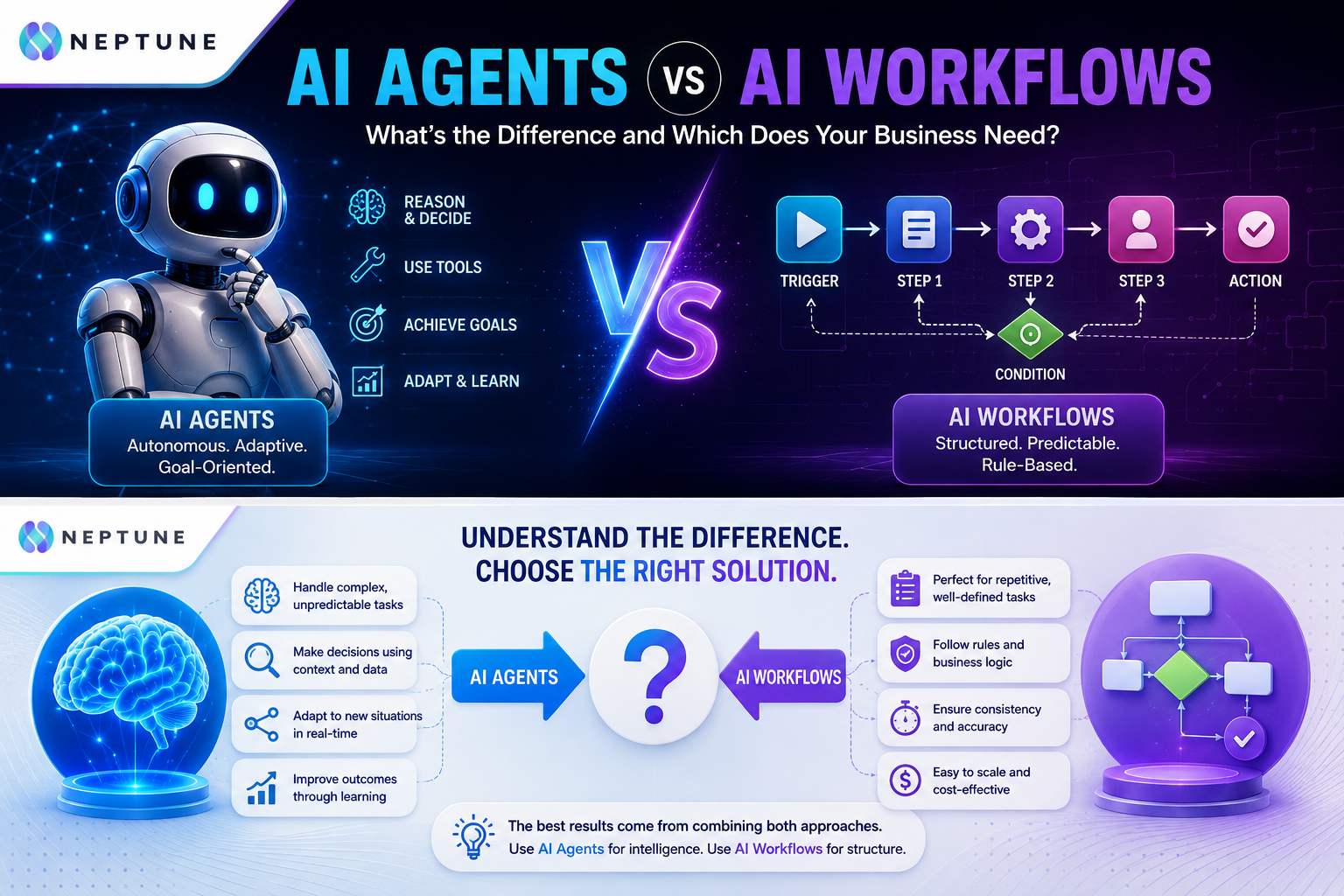
Artificial intelligence is moving from simple chatbots and content-generation tools into the actual machinery of modern businesses. Companies are no longer asking only, “Can AI write this for us?” They are asking a much more practical question: Can AI actually do the work? That question has pushed two concepts into the spotlight AI agents and AI workflows. Although the terms are sometimes used interchangeably, they describe different approaches to business automation. A workflow generally follows a defined sequence of steps, while an AI agent can interpret a goal, choose tools, make decisions, and adjust its actions based on what it discovers. Understanding that difference matters because choosing an agent simply because it sounds more advanced can create unnecessary complexity, higher costs, and governance challenges. On the other hand, forcing a rigid workflow onto a process full of exceptions can leave employees doing the difficult work manually anyway. The smartest approach is not to ask which technology is “better,” but to identify which type of intelligence your business process actually requires.
Table of Contents
- What Are AI Agents?
- What Are AI Workflows?
- AI Agents vs AI Workflows: The Core Difference
- How AI Agents Work in a Business
- How AI Workflows Work in a Business
- AI Agents vs AI Workflows Comparison
- When Should a Business Choose an AI Workflow?
- When Should a Business Choose an AI Agent?
- Can AI Agents and Workflows Work Together?
- Cost, Control, Security, and Scalability
- What is the main difference between an AI agent and an AI workflow?
- Are AI agents better than AI workflows?
- Can an AI workflow include AI?
- Which is safer for a business: an AI agent or an AI workflow?
- Should a small business start with AI agents or workflows?
What Are AI Agents?
An AI agent is a software system designed to pursue a goal with a degree of independence rather than simply executing one predetermined instruction. It typically combines a large language model or another AI model with instructions, access to tools, relevant data, and rules that define what it can and cannot do. Instead of receiving a command such as “send this email,” an agent might receive a broader objective such as “review these customer requests, identify urgent cases, investigate the relevant account information, prepare responses, and escalate anything unusual.” The agent can then determine which steps are necessary, select appropriate tools, inspect results, and continue until it reaches an appropriate stopping point. This flexibility is powerful, but it also means businesses need stronger controls, testing, monitoring, and accountability.
How AI Agents Make Decisions
The defining characteristic of an AI agent is its ability to make bounded decisions during task execution. A traditional automation system might say, “If a new form arrives, copy the customer’s name into the CRM, create a ticket, and send an email.” An agent can handle a less predictable situation: it might examine the form, determine what type of request the customer has made, search internal documentation, check the customer’s history, decide which system should be queried, and choose whether the request can be handled automatically or needs a human. This does not mean an agent has unlimited intelligence or should be trusted without restrictions. Good agent design defines its purpose, tools, permissions, escalation rules, and stopping conditions before it is deployed. That makes agents particularly useful when the input is messy, the path is uncertain, or exceptions are common.
What Are AI Workflows?
An AI workflow is a structured sequence of tasks that moves information or work from one stage to another. The workflow may include AI-powered steps, but the overall process is usually designed in advance. A simple example might be: a customer submits a form, the system extracts the information using AI, checks whether required fields are present, creates a CRM record, sends a notification to a sales representative, and stores the result in a database. Each step has a known purpose and generally follows a predictable path. Workflows can be extremely sophisticated, and adding AI does not automatically turn a workflow into an autonomous agent. The strength of a workflow is that the business knows what is supposed to happen. For businesses dealing with repetitive operations, this predictability can be more valuable than autonomy.
How AI Workflows Follow Defined Steps
AI workflows usually start with a trigger and then move through predefined actions, conditions, approvals, or integrations. The trigger might be a new email, a form submission, a calendar event, a CRM update, a payment, a scheduled time, or an uploaded document. After that trigger occurs, the workflow executes the steps that have already been configured. AI can be inserted into individual stages—for example, to classify an email, extract information from a document, summarize a meeting, or generate a draft response—while the surrounding process remains deterministic. This hybrid model can be especially useful because it places AI where interpretation is valuable without allowing the entire process to become unpredictable. You can test it, document it, audit it, and explain exactly what should happen when a particular event occurs.
AI Agents vs AI Workflows: The Core Difference
The simplest way to understand the difference is this: an AI workflow is primarily designed around the process, while an AI agent is primarily designed around the goal. A workflow tells the system which steps to perform and generally determines the path before execution begins. An agent is given a goal and enough capabilities to determine the appropriate steps while working toward that goal. Workflows tend to offer predictability, repeatability, easier auditing, and tighter control. Agents tend to offer flexibility, contextual reasoning, and the ability to deal with situations that were not explicitly anticipated when the system was designed. A business does not necessarily have to choose one technology forever. In many mature implementations, the best architecture uses workflows for predictable operations and agents for ambiguous decisions inside those operations.
Autonomy vs Predictability
Autonomy and predictability are two of the most important dimensions when comparing AI agents with workflows. An agent may decide that the next action should be different from the one a developer originally expected because the available information has changed. A workflow generally does not make that kind of independent choice unless its designers explicitly built conditional branches for it. This gives workflows an advantage when a business needs precise repeatability. If an accounting process requires every invoice above a certain threshold to receive approval, a deterministic rule can enforce that requirement consistently. Agents become more valuable when the process contains ambiguity that is expensive to encode as hundreds of rules. The trade-off is straightforward: the more freedom you give an AI system, the more carefully you need to manage what it is allowed to do.
How AI Agents Work in a Business
A business AI agent normally combines several components that work together as a decision-and-action loop. The AI model interprets the current situation, instructions establish its responsibilities, tools give it access to external systems, and data provides the context needed to make useful decisions. The agent then takes an action, observes the result, and determines whether it needs to continue, change direction, ask for help, or stop. This creates a dynamic process rather than a simple input-output transaction. Consider a sales development agent. Instead of merely generating an email from a template, it might research a prospect using approved sources, inspect CRM history, identify relevant information, draft personalized outreach, update the CRM, and create a follow-up task. The agent’s value comes from coordinating these actions while adapting to the information it encounters.
Tools, Data, Reasoning, and Actions
Tools are what turn an AI model from a conversational system into an operational agent. Without tools, a model can generate suggestions, but it may not be able to update a CRM, retrieve an internal record, create a ticket, query a database, or send an approved communication. With appropriate tools, an agent can interact with the systems where business work actually happens. Data is equally important because even strong reasoning is not useful if the agent is working with incomplete, outdated, or incorrect information. Instructions and guardrails then establish the boundaries around those capabilities. This is why deploying an agent is not simply a matter of writing a clever prompt. The organization must design permissions, tool interfaces, data access, evaluation criteria, error handling, and human escalation.
How AI Workflows Work in a Business
AI workflows are often easier for businesses to understand because they resemble the process diagrams companies have used for years. You identify the starting event, define the steps, connect the necessary systems, establish conditions, and decide what should happen when something succeeds or fails. AI can then enhance individual steps by interpreting language, classifying information, extracting data, summarizing content, or generating drafts. The workflow remains responsible for coordinating the overall sequence. This structure is particularly helpful when a process must be performed consistently across hundreds or thousands of cases. For example, an employee onboarding workflow might begin when HR creates a new employee record, generate required documents, notify IT, create accounts, schedule training, and send a welcome message.
Triggers, Conditions, and Automated Actions
The strength of a workflow comes from its ability to convert business rules into repeatable execution. A trigger starts the process, conditions determine which branch should be followed, and actions move information between systems or initiate tasks. Some workflows may also include approvals, retries, notifications, schedules, and exception handling. The major advantage is visibility: business teams can often look at the process and understand what happens next. That visibility becomes particularly important when a process affects financial transactions, customer records, compliance obligations, or employee data. A workflow can also be easier to test because the expected path is known in advance.
AI Agents vs AI Workflows Comparison
The practical differences become clearer when the technologies are placed side by side. An AI workflow generally prioritizes control, consistency, and repeatability, while an AI agent prioritizes reasoning, flexibility, and goal-oriented execution. Neither automatically wins because businesses have different requirements. A regulated finance operation may prefer a workflow for the final approval process while using an agent to summarize supporting documents. A customer-support operation may use a workflow to route tickets and an agent to investigate complicated cases.
| Feature | AI Workflows | AI Agents |
|---|---|---|
| Main Purpose | Automate predefined business processes | Achieve goals through dynamic decision-making |
| Execution | Follows predefined steps | Determines the next action based on context |
| Decision-Making | Rules and conditions | AI reasoning within defined boundaries |
| Autonomy | Low to moderate | Moderate to high |
| Flexibility | Best for predictable processes | Best for changing or complex situations |
| Best For | Repetitive and structured tasks | Complex and variable tasks |
| Data Handling | Mostly structured data | Structured and unstructured data |
| Exception Handling | Uses predefined branches | Can investigate and adapt |
| Predictability | High | Moderate |
| Control | Easier to control and audit | Requires stronger guardrails |
| Implementation | Usually simpler | Usually more complex |
| Maintenance | Easier when rules remain stable | Requires ongoing evaluation |
| Human Approval | Easy to add at specific steps | Often needed for sensitive actions |
| Scalability | Excellent for repetitive tasks | Excellent for knowledge-intensive tasks |
| Example | Automatically route invoices for approval | Investigate an unusual invoice and recommend an action |
The real question is how much uncertainty exists inside the process. If uncertainty is low, deterministic automation usually has an advantage. If uncertainty is high and humans currently spend significant time interpreting information and deciding what to do next, agentic systems can create more value. The best architecture often combines both.
When Should a Business Choose an AI Workflow?
A business should usually start with an AI workflow when the process is stable, repeatable, measurable, and governed by clear rules. If employees perform essentially the same sequence every day, automating that sequence can deliver immediate benefits without requiring an autonomous decision-maker. Examples include invoice routing, employee onboarding, scheduled reports, lead notifications, data synchronization, appointment reminders, document storage, and standardized approval processes. Workflows are also attractive when a business needs to demonstrate exactly what happened and why. The workflow can still include AI, but AI should be placed where it adds genuine value rather than being inserted everywhere simply because it is fashionable.
Best Use Cases for Workflows
AI-enhanced workflows are particularly useful for operations where the business already knows the desired process but needs software to execute it faster. Consider marketing operations: a new lead arrives, the system validates the data, an AI model classifies the lead, the CRM record is updated, the appropriate salesperson is notified, and a follow-up task is created. Consider finance: an invoice arrives, AI extracts the fields, the workflow checks required information, applies approval rules, sends the invoice to the correct manager, and stores the final record. Consider customer operations: a support request arrives, AI identifies its category, the workflow routes it to the right queue, sets priority, and sends an acknowledgment. These processes benefit from predictable execution because the business wants every case to pass through the same essential controls.
When Should a Business Choose an AI Agent?
An AI agent becomes more attractive when the task requires interpretation, investigation, judgment, tool selection, or adaptation. Imagine a customer support issue that does not fit neatly into a predefined category. The agent may need to understand the customer’s explanation, search documentation, inspect account history, determine which policy applies, perform several checks, and decide whether it can resolve the issue or should escalate it. A rigid workflow could do this only if developers had anticipated the possible paths in advance. An agent can instead reason through the case within its defined boundaries. The same concept applies to research, IT troubleshooting, sales research, document analysis, and operational investigations.
Best Use Cases for Agents
Strong AI-agent use cases usually have three characteristics: the goal is clear, the route to the goal is variable, and the agent has access to useful tools and information. A research agent might need to search multiple approved sources, compare findings, identify contradictions, and produce a briefing. An IT agent might inspect logs, check documentation, test potential causes, and recommend or execute a permitted fix. A sales agent might analyze account information, research a prospect, prepare a personalized briefing, and create follow-up tasks. These examples involve more than one simple action, and the correct sequence may depend on what the system discovers. That is where agentic behavior can outperform a fixed workflow.
Can AI Agents and Workflows Work Together?
Yes—and for many businesses, this is likely to be the most practical long-term approach. Instead of choosing between a workflow and an agent, companies can create a hybrid architecture in which deterministic workflows control important business processes while agents handle tasks requiring interpretation or flexible reasoning. Imagine a customer-service process where a workflow receives every incoming ticket, verifies required information, records the case, and applies compliance rules. An AI agent can then investigate complex tickets, consult approved knowledge sources, analyze the customer’s history, and recommend a resolution. Once the agent finishes, the workflow can take over again to record the result, notify the customer, update reporting systems, and close the case.
Cost, Control, Security, and Scalability
Choosing between agents and workflows is not only a technical decision; it is also a business economics and risk decision. Workflows are often easier to predict because the system follows predefined logic, which can simplify testing and operational monitoring. Agents may require additional model usage, tool calls, evaluations, observability, guardrails, and human oversight, particularly when they operate across several systems. That does not mean agents are necessarily more expensive in the long run. If an agent can automate a complex knowledge-work task that previously required several hours of employee effort, the economic value may be substantial. Security also deserves special attention because an agent with tools can potentially read data or take actions that a simple chatbot cannot.
Choosing the Right Approach for Your Business
A practical decision framework starts with the process rather than the technology. Ask what triggers the work, how predictable the steps are, how often exceptions occur, what types of data are involved, what decisions must be made, what systems need to be accessed, and what happens if the system makes a mistake. If the answers describe a stable sequence with clear rules, start with a workflow. If the answers describe an open-ended objective requiring investigation and dynamic decisions, consider an agent. If the process contains both characteristics, build a hybrid solution. Start with a narrow use case where success can be measured. Track metrics such as processing time, cost per case, completion rate, error rate, escalation rate, employee hours saved, and customer satisfaction.
Conclusion
The difference between AI agents and AI workflows becomes much easier to understand once you stop thinking about them as competing buzzwords. An AI workflow is primarily a structured process: it follows predefined steps, applies conditions, connects systems, and produces predictable outcomes. An AI agent is primarily a goal-oriented system: it interprets context, reasons about what to do next, selects tools, takes actions, and can adapt when circumstances change. Workflows are excellent for repeatability, control, and consistency, while agents are powerful when businesses face ambiguity, unstructured information, and complex decisions. For many businesses, the best answer will not be “agents instead of workflows” but agents inside well-designed workflows. Start with the business process, identify where predictable automation is enough, and reserve autonomy for the areas where AI reasoning creates measurable value.
FAQs
The main difference is how they determine what happens next. An AI workflow generally follows a sequence of steps that has been designed in advance, while an AI agent can use reasoning to determine the next appropriate action based on the current situation. Workflows are therefore more predictable, while agents are generally more adaptable. A business can also combine the two approaches rather than choosing only one.
Not necessarily. AI agents are better suited to tasks involving ambiguity, complex reasoning, unstructured information, and changing conditions, while workflows are often better for repeatable processes with clear rules. Using an agent for a simple process can add unnecessary complexity and risk. Using a rigid workflow for a highly variable process can be equally inefficient.
Yes. Many useful business workflows combine traditional automation with AI-powered steps. For example, a workflow could receive an email, use AI to classify its contents, apply a predefined business rule, update a CRM, and notify an employee. The presence of AI inside a workflow does not automatically make the entire system an autonomous agent.
A workflow is generally easier to predict and audit because its path is predefined, but safety ultimately depends on how either system is designed. Agents require particularly careful controls because they can make decisions and interact with tools dynamically. Businesses should use appropriate permissions, guardrails, logging, testing, monitoring, and human approval for sensitive actions.
Most small businesses should start with the simplest automation that solves a measurable problem. If the process involves repetitive steps such as lead routing, email notifications, appointment reminders, reporting, or data entry, a workflow may be the best starting point. If employees spend significant time researching information, interpreting documents, troubleshooting issues, or making variable decisions, an AI agent may eventually provide more value.