
AI automation for WhatsApp and Slack: why model routing matters more than message bridging
Anyone can pipe a WhatsApp message into Slack. The question worth asking before you buy or build anything is what decides what happens to that message once it lands, and whether that decision is quietly costing you more than it should.
- What “AI automation” actually means here
- Message bridging vs. intelligent routing
- How an AI routing engine decides where a message goes
- Why routing changes what AI automation actually costs
- Common use cases
- Security and compliance basics
- Setting it up, step by step
- What to look for in a platform
- FAQs
- Conclusion
What “AI automation” actually means for WhatsApp and Slack
WhatsApp is where customers and partners message you directly. Slack is where your team actually works. For most companies, the two are still connected by a person copy-pasting between them, or by a keyword-matching bot that can point someone at a help article and not much else.
“AI automation” across this pairing means three things happen without a person doing them manually for the routine cases:
- Understanding what a message is actually asking, beyond keyword matching
- Deciding which AI model, or which human team, should handle it
- Acting : answering directly, pulling data from a connected system, or routing a prioritized summary into the right Slack channel
Most tools in this space stop at the first step, or skip the second entirely. That second step, the decision, is where the rest of this guide focuses, and it’s the core of what an AI orchestration platform is built to do.
Message bridging vs. intelligent routing
Message bridging relays a message as-is: a WhatsApp text shows up in a Slack channel, a Slack reply goes back out over WhatsApp. Useful. It gets conversations out of someone’s personal phone and into a shared, searchable place. But no judgment is applied. The AI’s job is transport, not decision-making.
Intelligent routing adds a layer on top: before anything is answered, the system evaluates the message and decides how it should be handled: which model should respond, or whether it needs a human at all.
Message bridging
Moves messages as-is
Intelligent routing
Decides how to handle it
Bridging is the foundation: messages need to move reliably before anything smarter can run on top of them. Routing is what decides whether the automation actually saves time and money, or just relocates the same workload.
How an AI routing engine decides where a message goes
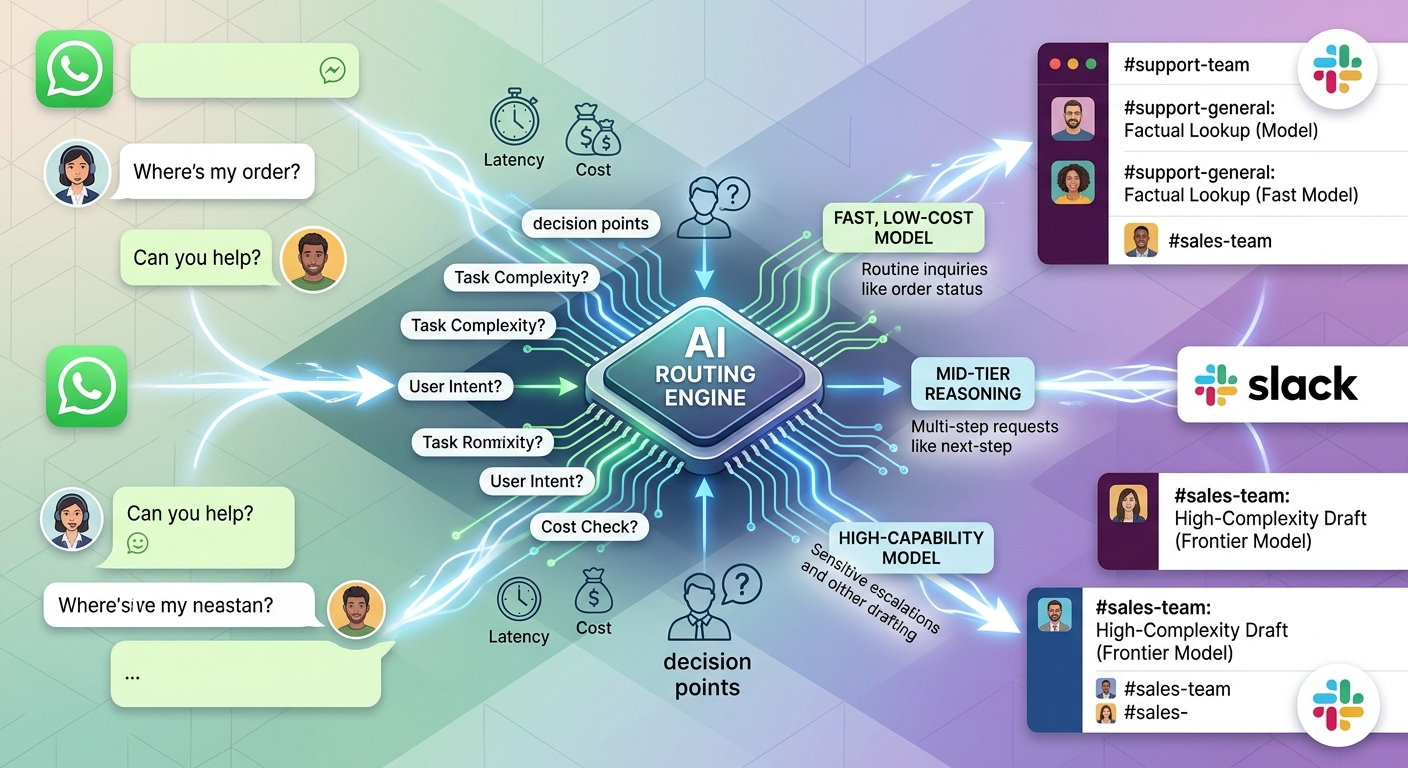
For each incoming message, a routing engine typically evaluates three things before responding:
- Task type : a factual lookup, a drafting task, or a multi-step troubleshooting request
- Complexity : a short, well-defined question versus something needing real reasoning across context
- Cost and latency needs : does this need to resolve instantly, or can a few extra seconds buy a better answer
Based on that evaluation, the message is sent to the model best suited to it, a fast, low-cost model for a one-line WhatsApp order-status question, a more capable model for a Slack thread that needs summarizing or a nuanced customer reply drafted.
Why routing changes what AI automation actually costs
Sending every message, a one-word WhatsApp confirmation and a multi-turn Slack escalation alike, to the same top-tier model is the most common reason AI automation budgets grow faster than expected. Simple messages don’t need a frontier model’s reasoning ability, but without a routing layer, they get it anyway, at full price, every time.
| Message type | Example | Model tier needed |
| Simple FAQ | “Where’s my order?” | Fast, low-cost |
| Multi-step request | “My last 3 orders show different addresses, can you fix this?” | Mid-tier reasoning |
| Sensitive escalation | Refund dispute, legal or compliance wording | High-capability model or human handoff |
Common use cases
Customer support across channels
Order status, returns, and account questions arriving on WhatsApp get resolved automatically for routine cases, while anything ambiguous or sensitive is escalated into the right Slack channel with full context attached, so no one has to ask the customer to repeat themselves.
Internal team requests
IT, HR, or finance questions posted in an internal Slack channel get routed to the model (or knowledge base) best suited to answer them, instead of sitting in a queue for a human to triage.
Sales and lead follow-up
A WhatsApp inquiry from a prospect gets classified by intent (pricing question, demo request, objection) and routed accordingly, with a summarized, prioritized version landing in the sales team’s Slack channel.
Security and compliance basics
Before connecting customer-facing channels like WhatsApp, confirm, don’t assume, what the platform actually supports:
- Stated compliance certifications (e.g., SOC 2 Type II, ISO 27001)
- Where message data is stored, and for how long
- Whether data connectors (order systems, CRMs) use OAuth with scoped, revocable access
- Whether the integration follows Meta’s WhatsApp Business Platform policies for automated messaging, rather than an unofficial workaround
- Whether you can restrict AI access to specific Slack channels, keeping sensitive internal channels out of scope
Setting it up, step by step
- Connect WhatsApp and Slack : authenticate both via OAuth from your automation platform’s settings.
- Define routing rules : set the logic for which message types map to which model tier, and what should escalate straight to a human.
- Map Slack destinations : decide whether messages land in a shared channel, a per-customer channel, or route by topic.
- Test with real message samples : run this through actual message types before going live, including edge cases like attachments, images, or ambiguous requests.
- Deploy and monitor : track which model each message type is routed to, resolution outcomes, and cost per conversation, then refine the rules as real patterns emerge.
What to look for in a platform
| Capability | Why it matters |
| Model routing (not just message bridging) | Determines whether cost scales with complexity or with raw message volume |
| No-code workflow builder | Lets non-engineers adjust routing rules without a dev cycle |
| Multi-model support (e.g. GPT-4, Claude, Gemini) | Avoids lock-in to a single model’s pricing or capability ceiling |
| Omnichannel delivery | WhatsApp, Slack, email, SMS from the same workflow, not separate tools per channel |
| Transparent per-conversation cost tracking | Makes the routing savings visible and auditable, not just a marketing claim |
FAQs
Can I automate WhatsApp and Slack without writing code?
Yes. Most modern AI automation and orchestration platforms provide a visual, no-code workflow builder for connecting the two channels, including routing logic, without requiring custom development.
Does AI model routing between WhatsApp and Slack actually save money?
It can, because it matches the model’s cost to the task’s complexity instead of sending every message to the same (often expensive) model. Actual savings depend on your message mix, the more routine, low-complexity messages you handle, the more you save by not sending them all to a top-tier model.
What’s the difference between a chatbot and AI automation for these channels?
A traditional chatbot typically matches keywords and returns a scripted or FAQ-style reply. AI automation with model routing evaluates each message’s intent and complexity, selects the most suitable model or a human, and can take multi-step actions rather than just replying.
Is WhatsApp-Slack AI automation secure enough for customer data?
It depends entirely on the specific platform. Confirm stated compliance certifications and data-handling policies directly with the vendor before connecting customer-facing channels, don’t assume compliance without checking documentation.
Do I need a different tool for WhatsApp than for Slack?
Not necessarily. Platforms built for omnichannel delivery handle both from a single workflow and routing layer, rather than requiring separate point tools stitched together.
How is this different from Zapier-style automation?
Rules-based automation tools like Zapier trigger fixed actions based on conditions you define. AI model routing adds a reasoning layer on top, the system evaluates each message’s content and complexity rather than following a fixed if-this-then-that rule.
Conclusion
Bridging WhatsApp and Slack solves where your messages live. Routing solves what happens to them once they arrive, and that’s where cost, response quality, and customer experience actually get decided. When evaluating a tool for this, ask not just “can it connect WhatsApp to Slack,” but “how does it decide which AI model handles each message, and what does that cost me.” That second question is usually where the real difference between tools shows up. See how it plays out against other options on the Neptune AI alternative page.