

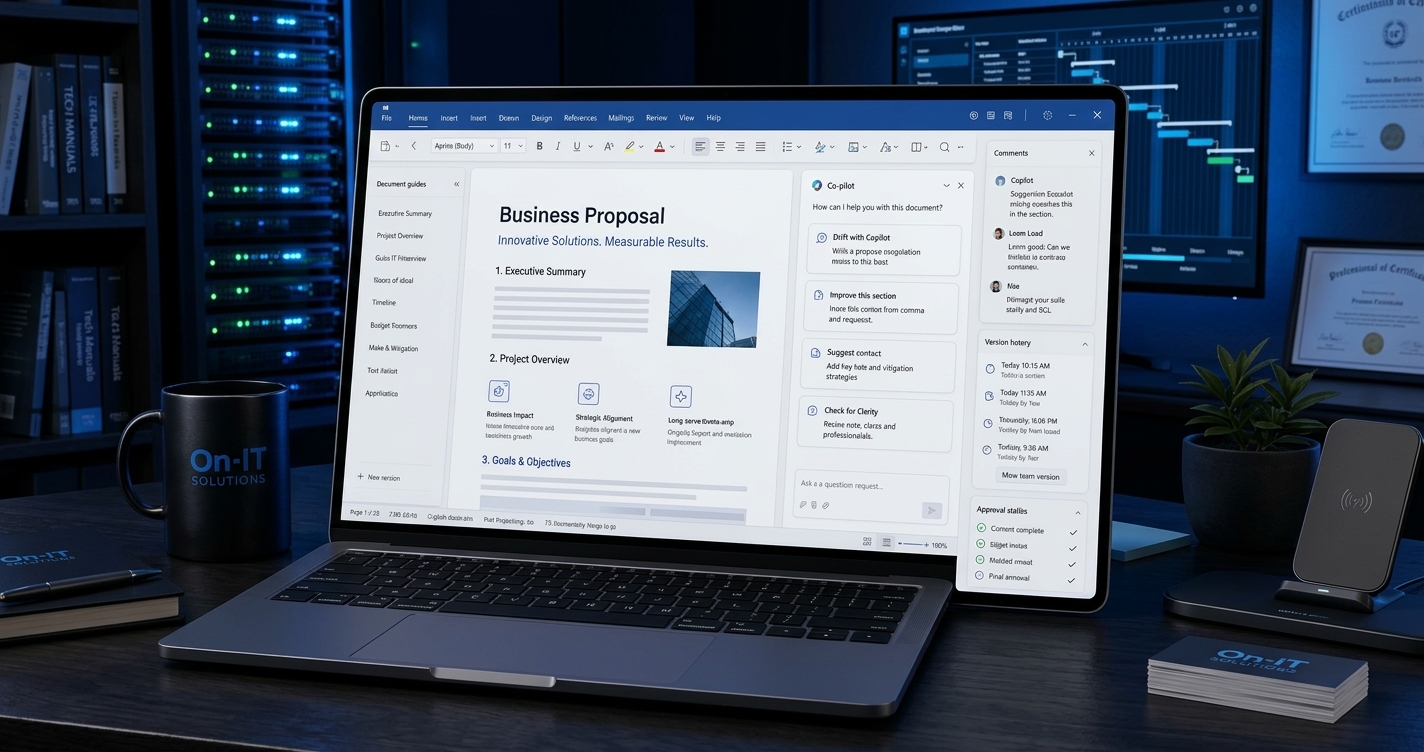
Creating a professional business proposal takes more than writing a few paragraphs. Businesses must understand client requirements, research opportunities, define project scopes, estimate costs, personalize recommendations, and prepare documents that clearly communicate value. When every proposal is created manually, these tasks can consume valuable time and slow down the sales process.
AI workflows can automate business proposal creation by connecting information gathering, content generation, data analysis, document preparation, and review into one repeatable process. Instead of starting from a blank page every time, businesses can use AI to organize relevant information, generate personalized drafts, and prepare proposals for approval with less repetitive work.
For US-based consultants, marketing agencies, software companies, freelancers, and growing businesses, this approach can make proposal preparation more consistent and scalable.
In this guide, you’ll learn how AI proposal automation works, which tasks it can handle, how to build an effective workflow, and how platforms like NeptuneAI can help businesses connect AI capabilities into practical business processes.
Table of Contents
- What Is AI Workflow Automation for Business Proposals?
- Why Manual Business Proposal Creation Is Challenging
- How AI Workflows Can Automate Business Proposal Creation
- Key Benefits of Automating Business Proposals With AI
- A Practical Example of an Automated Proposal Workflow
- Essential Features of an AI Business Proposal Workflow
- Best Practices for Accurate AI-Generated Proposals
- How to Get Started With AI Proposal Automation
- Frequently Asked Questions
- Final Thoughts
What Is AI Workflow Automation for Business Proposals?
AI workflow automation for business proposals is the process of using artificial intelligence, connected applications, business data, and predefined rules to streamline the creation of proposal documents.
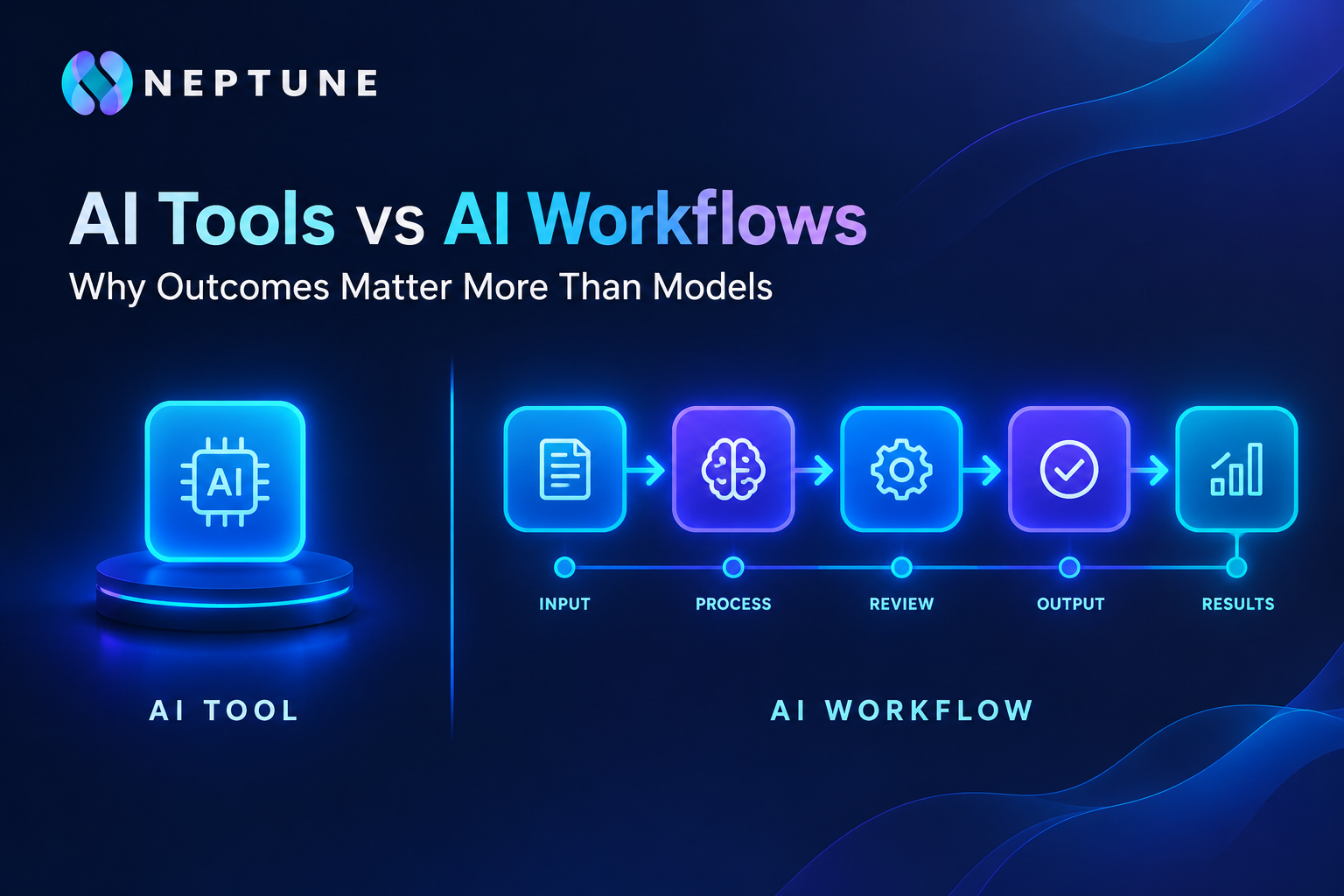
A traditional AI writing tool might generate a proposal from a prompt. An automated workflow can go further by collecting client information, retrieving approved company details, generating relevant sections, checking the output, and routing the document to the appropriate person for review.
For example, a consulting company could receive a new project inquiry through its website. An AI workflow could organize the client’s requirements, identify the services needed, prepare a proposed project scope, and create a first draft using the company’s approved proposal template.
A team member would then review the recommendations, verify pricing, and approve the final document before sending it to the prospective client.
The goal is not simply to generate text faster. It is to connect the different stages of proposal preparation into a more reliable process.
AI Proposal Generation vs. Traditional Proposal Writing
Traditional proposal writing often involves switching between emails, spreadsheets, previous documents, and project management tools. AI-powered workflows can connect these activities and reduce repetitive manual work.
The following comparison illustrates the difference:
| Traditional process | AI-powered workflow |
|---|---|
| Manually collect client details | Automatically organize submitted information |
| Search through old proposals | Retrieve relevant approved content |
| Write every section from scratch | Generate a tailored first draft |
| Copy information between documents | Transfer data through connected steps |
| Review every detail manually | Run preliminary completeness and consistency checks |
| Follow up using separate reminders | Trigger reminders through configured integrations |
AI automation does not eliminate the need for professional judgment. Instead, it helps teams spend less time on repetitive preparation and more time on strategy, accuracy, and client relationships.
Why Manual Business Proposal Creation Is Challenging
Business proposals often require input from multiple sources. Sales teams understand client requirements, project managers estimate delivery effort, finance teams verify costs, and subject-matter experts contribute technical recommendations.
Without a standardized process, bringing everything together can become difficult.
1. Repetitive Research and Information Gathering
Employees frequently review discovery-call notes, emails, questionnaires, and company documents before writing a proposal. Repeating this process for every prospect increases administrative workload.
AI workflows can organize incoming information and summarize the client’s objectives, challenges, budget expectations, and project requirements.
2. Inconsistent Proposal Quality
When several employees prepare proposals independently, the results may differ in structure, tone, formatting, and detail.
An AI workflow can use approved templates, brand guidelines, service descriptions, and standard sections to create more consistent drafts across the organization.
3. Delays Between Sales and Delivery Teams
Proposal preparation may stall while employees wait for pricing information, technical recommendations, or internal approval.
Workflow automation can route specific requests to the appropriate team, notify reviewers, and track outstanding tasks.
4. Difficulty Personalizing Every Proposal
Generic proposals often fail to address the specific problems a prospective client wants to solve.
AI can use relevant client information to tailor the introduction, proposed solution, project deliverables, and recommendations. The quality of this personalization depends on the accuracy and completeness of the available information.
5. Limited Visibility Into the Process
When proposals are managed through disconnected documents and email threads, managers may struggle to identify delays or understand which stage requires attention.
A connected workflow can provide status updates, flag incomplete information, and maintain a record of key process steps.
How AI Workflows Can Automate Business Proposal Creation
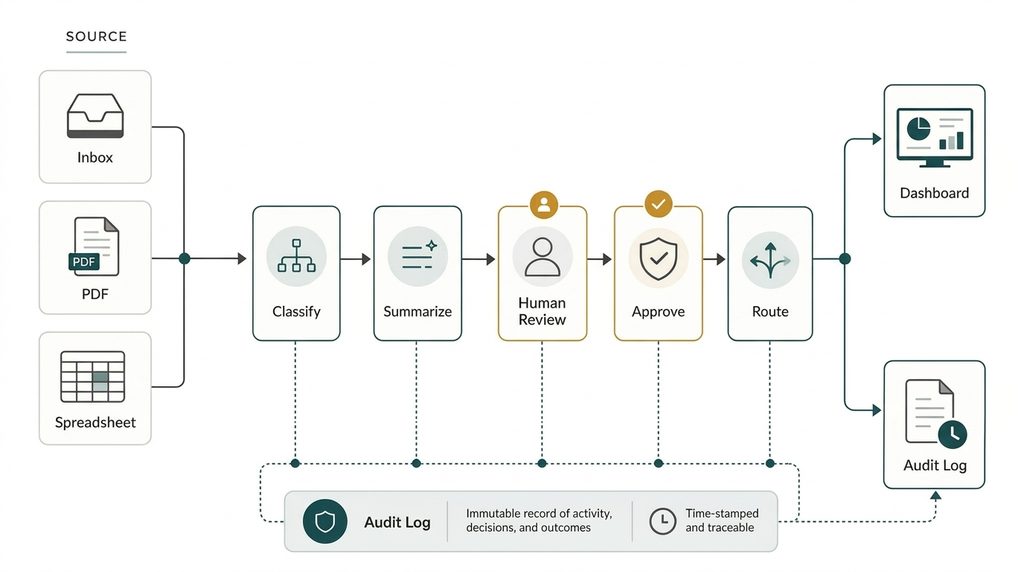
A well-designed AI proposal workflow breaks the process into connected stages. Each stage receives information, performs a defined task, and passes its output to the next step.
Here is how the process can work in practice.
Step 1: Collect Client Requirements Automatically
The workflow begins when a prospective client submits an inquiry, completes a discovery questionnaire, or reaches a particular stage in a CRM system.
The system collects available information, such as:
- Client name and business details
- Industry and target market
- Business challenges and objectives
- Requested services or project scope
- Budget and delivery expectations
- Relevant notes from sales conversations
AI can organize unstructured information into a structured summary. If essential details are missing, the workflow can flag the gaps and request clarification rather than making assumptions.
This creates a reliable starting point for proposal generation.
Step 2: Analyze the Client’s Needs
Once the information is collected, an AI model can analyze the client’s requirements and identify the main business problem.
For example, a company requesting marketing services may need better lead generation, improved conversion tracking, or a clearer content strategy.
The workflow can group these needs into priorities and map them to relevant services from the company’s approved service catalog.
This step helps ensure the proposal addresses the client’s actual objectives instead of presenting a generic list of services.
Step 3: Retrieve Relevant Company Information
An effective proposal should reflect what the business can genuinely deliver.
The workflow can retrieve approved information from a company knowledge base, including:
- Service descriptions and capabilities
- Previous project examples
- Approved case studies
- Standard terms and conditions
- Company credentials
- Pricing rules and proposal templates
Retrieving verified information helps reduce unsupported claims and makes it easier to reuse proven content.
Sensitive information and confidential client documents should only be accessible to authorized users and approved systems.
Step 4: Generate a Personalized Proposal Draft
With the client requirements and company information available, the AI model can generate the proposal’s main sections.
Depending on the project, these sections may include:
- Executive summary
- Client challenges and objectives
- Proposed solution
- Scope of work
- Project deliverables
- Timeline and milestones
- Investment and payment terms
- Success metrics
- Next steps
The workflow can adapt the draft to the client’s industry, business size, project complexity, and stated priorities.
For instance, a proposal for a small US marketing agency may emphasize campaign deliverables and lead-generation goals, while a software development proposal may focus on technical requirements, implementation milestones, and ongoing support.
The same workflow structure can serve both businesses while using different approved information and templates.
Step 5: Validate Pricing, Scope, and Completeness
Generating persuasive content is only one part of proposal preparation. The document must also be commercially and operationally accurate.
A validation step can check whether required sections are present, dates follow the expected format, deliverables match the agreed scope, and pricing fields contain approved values.
For calculations, the workflow should use reliable business rules or calculation tools rather than depending solely on generated text.
It can also flag issues such as missing assumptions, inconsistent totals, unsupported claims, or conflicting project timelines. If a required check fails, the workflow can return the draft for correction instead of advancing it automatically.
Step 6: Format the Proposal Using a Standard Template
After validation, the workflow can transfer approved content into a branded document template.
Depending on the connected tools, the output may be a Word document, PDF, or web-based proposal. Formatting can include company branding, section headings, tables, pricing breakdowns, contact details, and signature fields.
Standardized templates help teams produce professional-looking documents without repeatedly rebuilding the layout.
Step 7: Send the Proposal for Human Approval
Before a proposal reaches a client, the appropriate person should review its content and commercial terms.
An automated workflow can notify a sales manager, project lead, or finance reviewer when the document is ready.
The reviewer can approve the proposal, request revisions, or send it back for clarification.
This approval stage is especially important when proposals contain custom pricing, legal commitments, sensitive information, or complex technical recommendations.
Step 8: Deliver the Approved Proposal and Track Follow-Ups
Once approved, the workflow can prepare the final document for delivery through an authorized email or proposal platform.
If the connected systems support it, automation can also record the proposal status, create a CRM activity, and schedule follow-up reminders.
For example, a sales representative could receive a reminder to contact a prospect if the proposal remains unanswered after a specified period.
The result is a more connected process that supports proposal preparation, approval, delivery, and follow-up.
Key Benefits of Automating Business Proposals With AI
AI proposal automation can improve several aspects of business operations when it is implemented around a clear, well-defined process.
Reduced Administrative Work
Employees spend less time collecting information, copying text, formatting documents, and repeating routine tasks. This frees up time for client discussions and proposal strategy.
Faster Proposal Preparation
Reusable templates, automated data collection, and AI-assisted drafting can reduce the time required to prepare a first draft.
Actual time savings vary depending on proposal complexity, data quality, integration requirements, and the amount of human review needed.
More Personalized Client Communication
AI can tailor proposal sections to a prospect’s industry, challenges, goals, and requirements. This makes it easier to prepare relevant documents without rewriting every section manually.
Improved Consistency Across Teams
Standard templates and approved content help maintain consistent messaging, formatting, and service descriptions across multiple proposals.
Fewer Avoidable Errors
Automated validation can identify missing information, inconsistent fields, and calculation discrepancies before a proposal is approved.
It cannot guarantee that every error will be detected, so final review remains important.
Better Workflow Visibility
Connected systems can show whether a proposal is awaiting information, being drafted, under review, approved, or ready for delivery.
This helps managers identify bottlenecks and improve the process over time.
Greater Scalability
As a business receives more inquiries, a repeatable AI workflow can help manage a larger volume of proposals without requiring every task to be completed manually.
Additional human review capacity may still be needed for complex or high-value opportunities.
A Practical Example of an Automated Proposal Workflow
Consider a US-based digital marketing agency that receives dozens of project inquiries each month.
The agency offers SEO, content marketing, paid advertising, and conversion optimization. Its team needs to prepare personalized proposals, but collecting information and drafting each document takes valuable time.
The agency decides to automate the repetitive parts of its proposal process.
The Workflow in Action
1. New inquiry: A prospective client submits a website form describing its marketing challenges, target audience, and business goals.
2. Information processing: The workflow organizes the submission and identifies missing details that need clarification.
3. Service matching: AI compares the client’s needs with the agency’s approved service catalog and recommends relevant services.
4. Proposal drafting: The system prepares an executive summary, proposed strategy, deliverables, and a draft timeline using an approved template.
5. Pricing validation: The workflow retrieves approved pricing rules and checks that the proposed services and totals are consistent.
6. Internal review: The account manager reviews the draft, adjusts the recommendations if needed, and approves the commercial terms.
7. Delivery and follow-up: The approved proposal is sent through the connected system, its status is recorded, and a follow-up reminder is scheduled.
What Changes for the Agency?

Instead of manually assembling every document, the agency uses its team’s time where it matters most: understanding the client, refining the proposed strategy, verifying the budget, and building trust.
The workflow also creates a repeatable process that can be reviewed and improved as the agency learns which proposal structures and services best fit different client needs.
The important point is that AI supports the process rather than making unverified business decisions on its own.
Essential Features of an AI Business Proposal Workflow
Not every AI tool provides the same level of automation. Businesses should evaluate the capabilities required for their proposal process before choosing a solution.
Multi-Step AI Processing
A useful workflow can separate information extraction, client analysis, content generation, and quality checks into individual steps.
This makes the process easier to test, maintain, and improve.
Business Data and API Integrations
Connections to CRM systems, databases, document storage, and other business applications can reduce manual data entry and help keep proposals aligned with current information.
The available integrations depend on the selected platform and configuration.
Conditional Logic and Validation
The workflow should be able to handle different situations. A simple project may follow a standard approval path, while a high-value proposal may require additional finance or management review.
Conditional rules help route each proposal appropriately.
Reusable Templates and Knowledge Sources
Approved proposal templates, service descriptions, case studies, and pricing references give AI the context it needs to create more relevant drafts.
These sources should be reviewed regularly so outdated information does not enter new proposals.
Human Approval Controls
Businesses should define which steps can run automatically and which require human approval.
Pricing exceptions, legal terms, contractual commitments, and high-risk recommendations generally deserve additional oversight.
Monitoring and Process Improvement
Workflow logs and performance metrics can help teams monitor execution, identify recurring errors, and understand where delays occur.
Useful metrics include average preparation time, revision frequency, approval time, and the percentage of drafts that pass validation on the first attempt.
Best Practices for Accurate AI-Generated Proposals
Automation is only as dependable as the information, instructions, and controls behind it. These practices can help businesses build a more reliable system.
Start With a Clearly Defined Process
Document how proposals are created today. Identify repetitive tasks, common delays, approval requirements, and the information each department needs.
Automating an unclear process can reproduce existing problems at a faster pace.
Use Verified Business Information
Provide AI with approved service descriptions, current pricing rules, relevant case studies, and accurate company details.
Do not allow the system to invent client results, certifications, capabilities, or contractual commitments.
Keep Pricing Under Business Control
Use approved price lists, formulas, and business rules for financial calculations. Require additional approval for discounts, exceptions, or unusual payment terms.
This reduces the risk of sending a proposal with incorrect commercial information.
Protect Client and Company Data
Use appropriate access controls, secure integrations, and approved data-handling practices. Avoid exposing confidential client information to systems that are not authorized to process it.
For US businesses, the workflow should also reflect applicable privacy, contractual, and industry-specific obligations.
Review the Output Before Sending
AI-generated content should be checked for factual accuracy, clarity, tone, scope, and suitability for the client.
Human review is particularly important for complex projects, regulated industries, and high-value proposals.
Measure Results and Improve Gradually
Begin with a limited proposal type, evaluate the output, and refine the workflow before expanding it across the business.
Monitor whether automation reduces administrative effort while maintaining proposal quality and commercial accuracy.
How to Get Started With AI Proposal Automation
Businesses do not need to automate every stage at once. A gradual approach makes it easier to test the process and demonstrate practical value.
Step 1: Choose one proposal type. Start with a recurring document, such as a consulting proposal, marketing services proposal, or software implementation proposal.
Step 2: Prepare the source information. Gather approved templates, service descriptions, pricing rules, and example proposals.
Step 3: Map the workflow. Define the trigger, required inputs, AI tasks, validation rules, approval stages, and final output.
Step 4: Connect the necessary systems. Integrate the tools that provide client data, business information, document generation, and delivery.
Step 5: Test realistic scenarios. Use representative examples, including incomplete requests, unusual pricing, and projects that require additional approval.
Step 6: Review performance. Compare preparation time, draft quality, revision frequency, and workflow reliability against the existing process.
Step 7: Expand carefully. Once the workflow performs reliably, adapt it to other proposal types and business teams.
How NeptuneAI Can Support AI Workflow Automation
NeptuneAI focuses on connecting AI models, APIs, workflow logic, and communication capabilities to execute multi-step business processes. This approach is relevant when a company wants to move beyond generating isolated AI responses and build a connected workflow from input to outcome.
For business proposal creation, a configured workflow could be designed around stages such as collecting client information, analyzing requirements, generating draft content, checking outputs, and routing documents for approval.
The exact process depends on the integrations, data sources, and workflow configuration available for the implementation. Businesses should confirm the required document-generation and delivery integrations before deployment.
By treating proposal creation as a complete business process, organizations can explore how AI automation fits into their wider sales and operational workflows.
Frequently Asked Questions
AI workflows can collect client information, analyze project requirements, retrieve approved business content, draft proposal sections, validate required fields, and route documents for human approval. Connected tools may also support delivery and follow-up tracking.
Common benefits include reduced repetitive work, faster first drafts, more consistent documents, improved workflow visibility, and easier scaling. Results depend on the quality of the workflow, integrations, source data, and review process.
AI can generate a complete first draft when provided with sufficient information and appropriate instructions. However, pricing, scope, legal terms, factual claims, and client-specific commitments should be verified before the proposal is sent.
Useful inputs include client requirements, project objectives, service descriptions, deliverables, pricing rules, timelines, relevant case studies, and an approved proposal template. Missing information should be flagged rather than invented.
Yes. Small businesses, freelancers, consultants, and agencies can benefit from automating recurring proposal tasks. Starting with a simple workflow for one proposal type can make implementation more manageable.
They can when the selected platform and connected applications support the necessary integrations. CRM data can provide client details, opportunity information, and sales notes that help personalize proposal drafts.
AI can use relevant client information to tailor the introduction, identify business challenges, recommend suitable services, and organize deliverables around specific goals. Reliable personalization requires accurate source information and appropriate review.
NeptuneAI provides an AI workflow orchestration approach that connects models, APIs, and workflow steps. A business proposal use case can be designed around these capabilities, subject to the required integrations and configuration.
Businesses can track average proposal preparation time, number of revisions, approval turnaround, completeness-check failures, and the percentage of drafts requiring substantial rework. Proposal acceptance rates can also be monitored, but they depend on factors beyond automation alone.
AI is better viewed as a way to reduce repetitive preparation work than as a replacement for sales expertise. Sales professionals remain important for understanding client needs, negotiating terms, developing relationships, and making final commercial decisions.
Final Thoughts

Business proposal creation involves research, planning, writing, validation, and coordination. Handling every stage manually can make it difficult for growing teams to respond efficiently while maintaining consistent quality.
AI workflows can automate business proposal creation by connecting these activities into a repeatable process. From organizing client requirements to preparing drafts and routing approvals, automation can reduce administrative effort while keeping important business decisions under human control.
The best approach is to start with a clearly defined proposal process, use reliable business information, validate critical details, and measure the results before expanding automation.
For businesses exploring connected AI workflows, NeptuneAI offers an approach to orchestrating models, APIs, and multi-step processes around practical business needs.
Ready to explore AI workflow automation for your business? Visit NeptuneAI to learn more about its AI-powered workflow capabilities and explore how connected AI processes can support your business operations.