

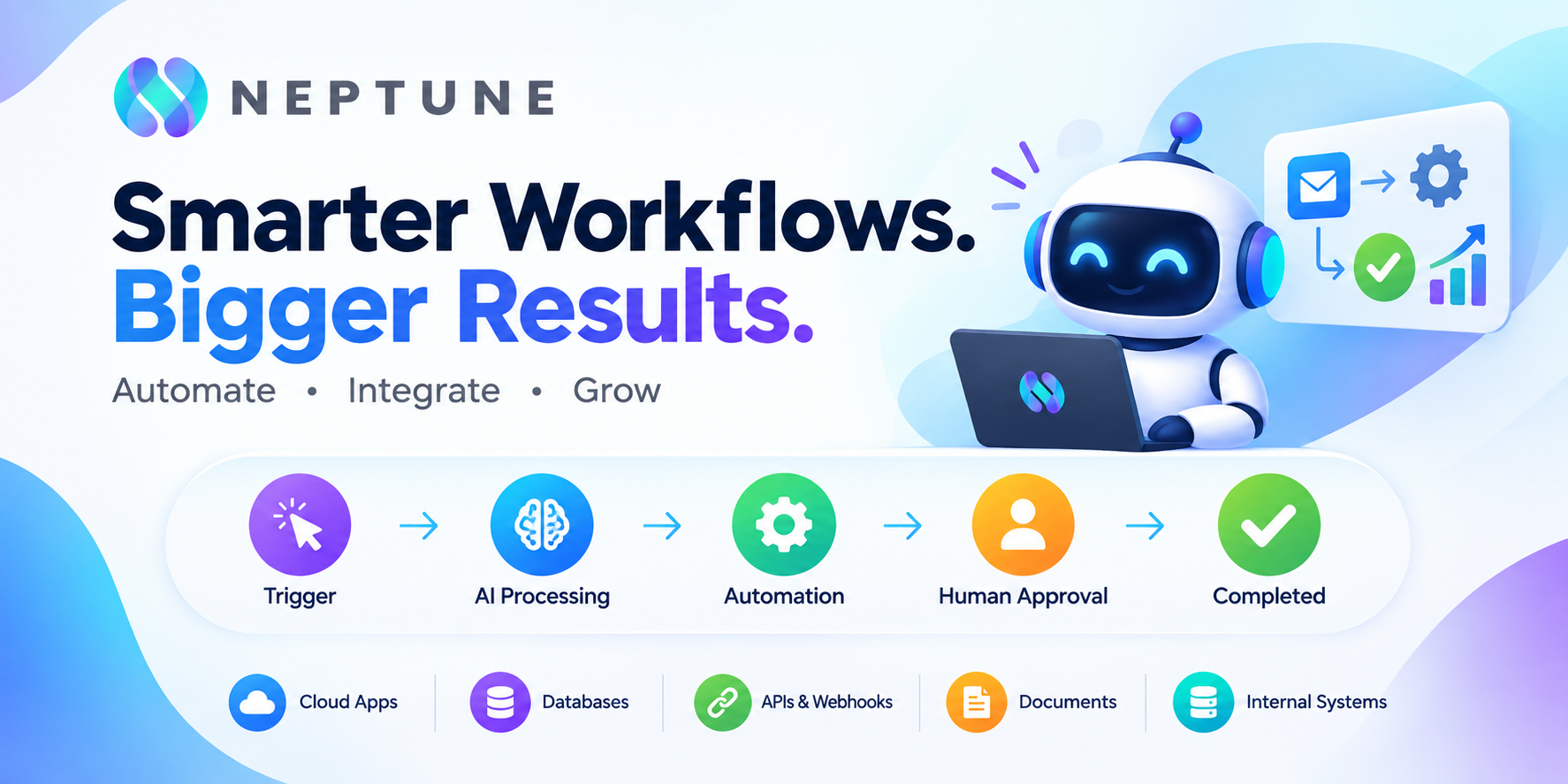
Enterprise automation is moving beyond simple rules, macros, and repetitive task execution. In 2026, businesses are increasingly looking at AI workflow automation software that can connect applications, interpret information, make decisions, execute tasks, and involve employees when judgment is required. The change matters because traditional automation was largely designed around predictable inputs and predefined rules, while modern AI systems can work with unstructured documents, natural-language requests, and changing business conditions. Recent enterprise research shows the gap clearly: organizations are adopting AI rapidly, but relatively few have successfully scaled orchestrated, cross-functional agentic workflows across the business.
That creates a practical problem for decision-makers. Buying an automation platform is not simply a question of asking which product has the most AI features. An enterprise needs to evaluate workflow orchestration, integrations, AI agents, security, governance, scalability, observability, compliance, implementation requirements, and total cost of ownership. A platform that looks inexpensive on a pricing page can become expensive once AI usage, integrations, implementation, training, and support are included. The right approach is therefore to evaluate the software against actual business processes rather than buying an impressive collection of features and hoping useful automation appears later.
Table of Contents
- Why Enterprise Workflow Automation Is Changing in 2026
- What Is AI Workflow Automation Software?
- How AI Automation Differs From Traditional Automation
- How AI Workflow Automation Works in an Enterprise
- AI Workflow Automation vs. Traditional Automation
- Core Features Enterprises Should Look For
- Multi-Model AI and Enterprise Integrations
- Data Management and Knowledge Integration
- Enterprise Security Requirements
- Data Privacy, Governance, and Compliance
- Reliability, Scalability, and Observability
- Enterprise Use Cases
- Customer Support, Sales, and Revenue Operations
- Finance, Operations, HR, and IT Automation
- Enterprise AI Workflow Automation Pricing
- Hidden Costs Beyond Software Pricing
- How to Calculate ROI
- Build vs. Buy an AI Automation Platform
- How to Compare Enterprise Platforms
- Implementation Roadmap and Common Mistakes
- Enterprise Buying Checklist and Future Trends
- Conclusion
- FAQs
- What is AI workflow automation software?
- How does AI workflow automation differ from RPA?
- Is AI workflow automation secure for enterprise use?
- How much does enterprise AI workflow automation software cost?
- Should an enterprise build or buy AI workflow automation software?
Why Enterprise Workflow Automation Is Changing in 2026
The enterprise automation market is changing because AI is moving from an assistant that answers questions to a participant that can perform work. A conventional automation might receive an invoice, extract a field, and place that information into an accounting system according to predefined rules. An AI-enabled workflow can potentially read the document, understand its context, identify missing information, compare it with purchase-order data, determine whether an exception exists, ask another system for supporting information, and route the case to an employee when the situation falls outside approved boundaries. That difference turns automation from a sequence of fixed instructions into something closer to a managed digital process.
The shift is happening alongside a broader enterprise AI adoption problem. Organizations may have dozens of AI tools, copilots, agents, SaaS applications, databases, and internal systems, but those tools often operate in isolation. The business value is not created simply because an employee can ask an AI model a question. Value appears when the AI capability is connected to the workflow where the work actually happens. This is why AI orchestration and workflow automation are becoming closely connected concepts. A useful enterprise platform must coordinate models, applications, people, data, and automated actions rather than treating an AI model as a standalone feature.
What Is AI Workflow Automation Software?
AI workflow automation software is a platform that uses artificial intelligence together with workflow orchestration, integrations, business rules, APIs, and automated actions to execute business processes with reduced manual intervention. A workflow normally begins with a trigger, such as a new customer request, incoming document, database event, CRM update, support ticket, or scheduled process. The platform then determines what should happen next, gathers the required information, invokes an AI model or agent when appropriate, performs one or more actions, and records the result.
The important distinction is that AI is not necessarily responsible for every part of the workflow. In a well-designed enterprise system, deterministic components handle predictable operations while AI handles tasks involving interpretation, classification, summarization, extraction, reasoning, or variable decision paths. This hybrid architecture is generally more practical than attempting to make every workflow step autonomous. For example, an enterprise could use fixed logic to verify that a purchase order exists, an AI model to interpret an unstructured supplier email, and a human approval step before releasing a high-value payment. The result is not simply “AI doing everything”; it is AI embedded inside a controlled business process.
How AI Automation Differs From Traditional Automation
Traditional workflow automation usually depends heavily on predefined rules. If condition A occurs, perform action B; if condition C occurs, route the task to department D. That approach remains valuable because deterministic automation is predictable, testable, and often easier to audit. AI workflow automation adds another layer by allowing software to work with information that does not fit neatly into predefined fields or rules.
This makes AI particularly useful for unstructured and semi-structured work. Emails, contracts, support conversations, reports, documents, and natural-language requests often require interpretation before a workflow can decide what to do next. An AI-enabled workflow can classify the input, extract relevant information, summarize the situation, recommend an action, or select an appropriate downstream process. The key is not replacing deterministic automation but combining it with AI where AI genuinely adds value.
How AI Workflow Automation Works in an Enterprise
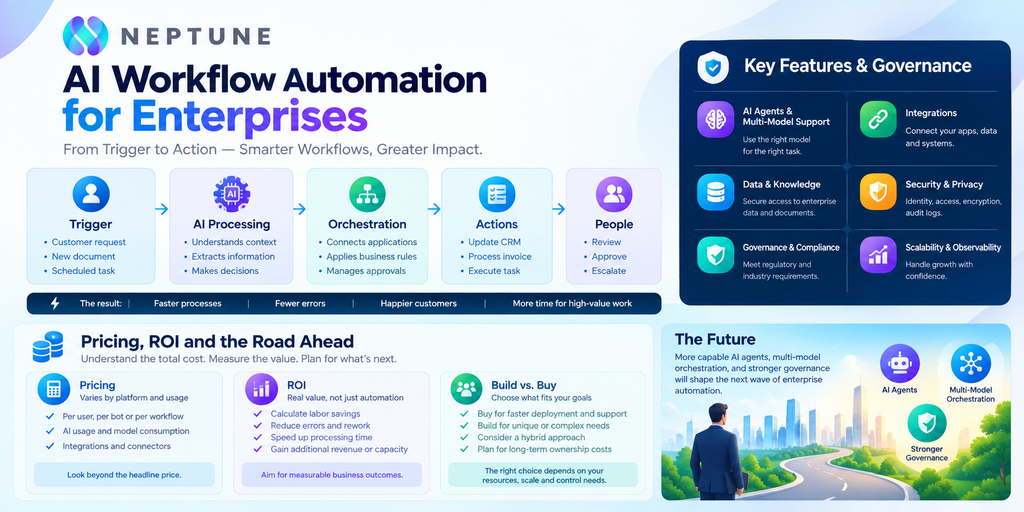
A typical enterprise workflow starts with an event. A customer submits a support ticket, a sales lead enters the CRM, an employee submits an expense, a supplier sends an invoice, or a monitoring system detects an operational problem. The workflow platform captures that event and determines which process should be initiated. It then connects to the relevant applications through APIs, connectors, databases, webhooks, or other integration mechanisms.
The workflow can then use AI to interpret information or make a bounded decision. Imagine a customer support request involving a billing problem. The automation could retrieve the customer’s account information from the CRM, examine the support message, classify the issue, check billing records, determine whether the request meets a refund policy, and either initiate an approved refund or route the case to a human agent. Throughout the process, the platform should maintain execution history, error information, permissions, and audit records. This visibility matters because enterprise automation cannot be treated like a black box. If something goes wrong, administrators need to know what happened, which systems were accessed, which AI model was used, and where the workflow failed.
AI Workflow Automation vs. Traditional Automation
The biggest mistake is assuming that AI workflow automation automatically makes traditional automation obsolete. It does not. Traditional RPA and rule-based workflows remain highly effective when processes are stable, repetitive, and predictable. If an employee performs the same sequence of actions in an old desktop application hundreds of times a day, deterministic automation may be cheaper and easier to control than introducing an AI agent.
AI becomes more useful when the workflow contains ambiguity. Consider document processing. A fixed workflow can handle a standardized invoice template extremely well, but a supplier might change its layout, include additional information, or send an email containing important context. AI can interpret that variability and pass structured information into the deterministic part of the workflow. This is why enterprise automation increasingly looks like a combination of RPA, APIs, business rules, AI models, agents, and human decisions rather than a single technology replacing everything else.
| Capability | Traditional Automation | AI Workflow Automation |
| Fixed rules | Excellent | Excellent |
| Repetitive tasks | Excellent | Excellent |
| Unstructured documents | Limited | Strong |
| Natural-language inputs | Limited | Strong |
| Adaptive decision-making | Limited | Stronger |
| AI agents | Usually absent | Supported |
| Human approvals | Supported | Supported |
| API integrations | Common | Common |
| Governance | Mature | Increasingly important |
| Predictability | Very high | Depends on AI component |
Core Features Enterprises Should Look For
The core feature set should begin with workflow orchestration, not flashy AI demos. An enterprise platform needs a visual or developer-friendly workflow builder, conditional logic, branching, retries, error handling, scheduling, reusable components, integrations, API connectivity, and centralized workflow management. Without these foundations, an AI agent may be capable of impressive individual tasks but still fail to become a reliable part of a production business process.
AI capabilities should then be evaluated in context. Look for AI agents that can operate within defined permissions, access approved enterprise tools, use relevant data, and hand work back to humans when necessary. Human-in-the-loop functionality is particularly important for high-impact decisions involving money, customers, employees, legal matters, or sensitive information. Monitoring and logging should also be built into the platform rather than added as an afterthought. Enterprise teams need to understand not just whether a workflow completed, but how it completed and whether its behavior matched the intended policy.
Multi-Model AI and Enterprise Integrations
Enterprises should also examine whether the platform supports multiple AI models. Different models have different strengths, costs, latency characteristics, context limits, and deployment options. A workflow might use one model for inexpensive classification, another for complex reasoning, and a specialized model for a particular document or language task. Multi-model routing can therefore become a strategic capability rather than a technical luxury.
The same principle applies to integrations. Enterprise processes rarely live inside one application. A sales workflow may touch a CRM, email system, enrichment provider, database, analytics platform, and internal application. A finance workflow may connect an ERP, document storage system, accounting platform, banking service, and approval application. A useful automation platform should therefore support standard connectors as well as custom APIs and webhooks. The more fragmented the enterprise technology environment, the more important the integration layer becomes.
Data Management and Knowledge Integration
AI automation is only as reliable as the information it can access. An enterprise may have customer information in a CRM, policies in a document repository, financial records in an ERP, product information in databases, and operational knowledge in internal wikis. An automation platform must connect these sources without turning sensitive information into an uncontrolled data pool.
This is where retrieval-augmented generation and enterprise knowledge integration become useful. Instead of expecting a model to know every company policy, the workflow can retrieve relevant approved information at execution time. However, retrieval alone is not enough. Organizations should consider data freshness, access permissions, source authority, synchronization, and conflict resolution. If two systems contain different customer information, the workflow needs a defined source of truth. Otherwise, AI may confidently automate the wrong answer.
Enterprise Security Requirements
Security becomes more important when software can execute actions rather than merely generate text. An AI assistant that drafts an email is one thing; an AI-enabled workflow that can modify customer records, approve purchases, issue refunds, or access internal databases is another. The security model must therefore cover both the platform and the actions performed through integrations.
Enterprises should evaluate authentication, authorization, role-based access control, identity-provider integration, encryption in transit and at rest, credential management, secrets handling, tenant isolation, network controls, audit logging, and administrative policies. The principle of least privilege should apply to AI agents just as it applies to human users. An agent performing customer-service classification does not need unrestricted access to financial systems. Giving an AI workflow excessive permissions simply because it is convenient creates unnecessary risk.
Security should also include operational controls. Administrators need the ability to disable workflows, revoke credentials, review activity, investigate failures, and restrict which users can build or publish automations. Platforms targeting serious enterprise deployments increasingly provide governance controls around automation development, identity, audit, and data. Those features should be evaluated during procurement rather than after deployment.
Data Privacy, Governance, and Compliance
Privacy becomes complicated when workflows send enterprise information to AI models. Organizations need to understand what data is processed, where it is processed, how long it is retained, whether it is used for model training, and which subprocessors may receive it. These questions become especially important when workflows handle customer records, employee information, health information, financial information, or confidential intellectual property.
Governance should cover more than privacy notices. Enterprises should establish policies defining which AI models can be used, which information may be processed, what actions agents can perform, which decisions require human approval, and how AI activity is monitored. Certifications can help establish a baseline, but a compliance badge should never be treated as proof that a particular workflow is safe. The real question is whether the platform’s controls match the organization’s specific risk profile.
For regulated industries, compliance requirements may include SOC 2, GDPR, HIPAA, regional privacy regulations, financial controls, or industry-specific requirements. The exact obligations depend on the organization and its activities, so buyers should involve security, legal, compliance, and data-governance teams before approving production deployment.
Reliability, Scalability, and Observability
An enterprise automation platform must continue working when volume increases. A workflow that performs perfectly for 100 transactions per day may behave very differently when it handles 100,000. Buyers should therefore investigate concurrency, throughput, queue management, retry behavior, rate limits, failover, redundancy, regional availability, and recovery procedures.
Observability is equally important. Administrators should be able to inspect execution histories, identify failed steps, measure processing time, monitor AI usage, and receive alerts when workflows behave abnormally. For AI-powered workflows, observability should ideally extend to model calls and AI decisions. The objective is not necessarily to expose every internal reasoning process, but to maintain enough operational evidence to understand what inputs were used, what action occurred, and whether the workflow followed policy.
A useful enterprise platform should make failures understandable. If a customer workflow fails because an external API is unavailable, the system should retry or route the case appropriately rather than silently losing the request. Reliability is not an optional enterprise feature. If automation creates more manual investigation than it removes, the business has simply moved its workload somewhere else.
Enterprise Use Cases
The strongest use cases generally involve repetitive processes with significant data movement, predictable outcomes, and measurable labor or service costs. Customer support, sales operations, finance, procurement, HR, IT service management, and document processing are common starting points. These processes often involve several applications and substantial manual coordination, making orchestration valuable.
Customer support can use AI to classify incoming requests, retrieve account information, suggest responses, update CRM records, and escalate complicated cases. Sales teams can automate lead enrichment, qualification, routing, follow-ups, and CRM updates. Finance departments can automate invoice extraction, matching, approval routing, reconciliation, and exception handling. HR teams can automate employee requests, document workflows, onboarding tasks, and internal knowledge processes.
The best enterprise use cases are not necessarily the most futuristic ones. A workflow that saves 500 employee hours every month is often more valuable than an impressive autonomous agent that handles a small experimental task. Businesses should therefore start with measurable operational pain rather than asking, “Where can we use AI?”
Customer Support, Sales, and Revenue Operations
Customer support is particularly suitable for AI workflow automation because support requests often contain natural language but ultimately require structured actions. An AI system can identify the customer’s intent, retrieve account information, determine the appropriate workflow, and either resolve the request or route it to the correct employee. The automation can also update the CRM and maintain a record of what happened.
Sales and revenue operations offer similar opportunities. A new lead can trigger enrichment, company classification, scoring, territory assignment, CRM updates, and personalized follow-up. Instead of asking sales representatives to manually move information between systems, the workflow handles routine operations while employees focus on opportunities that actually require human interaction. The important metric is not how many AI actions occurred; it is whether qualified opportunities move through the pipeline faster and with fewer errors.
Finance, Operations, HR, and IT Automation
Finance workflows can benefit from AI because financial departments process large amounts of structured and unstructured information. An invoice might arrive as a PDF, email attachment, scanned document, or supplier portal record. AI can extract the relevant information, while deterministic logic validates amounts, vendor records, purchase orders, and approval policies. Exceptions can then be routed to an employee instead of allowing the automation to make an unsupported financial decision.
IT operations provide another strong use case. A monitoring system can trigger a workflow when an incident occurs, retrieve relevant system information, classify the event, execute approved remediation steps, and notify the responsible team. HR and procurement can use similar patterns for onboarding, employee requests, vendor management, approvals, and document processing. Across these departments, the strongest architecture usually combines AI interpretation with deterministic controls and human oversight.
Enterprise AI Workflow Automation Pricing
Pricing is one of the hardest parts of comparing enterprise automation platforms because vendors use different licensing structures. Some platforms charge per user, others charge per workflow, bot, task, execution, or usage unit, while enterprise agreements may combine a platform fee with consumption-based charges. The pricing model can materially change the economics of a deployment.
For example, Microsoft currently lists Power Automate Premium at $15 per user per month when paid yearly, while its Process plan is listed at $150 per bot per month and Hosted Process at $215 per bot per month, before applicable variations and organizational pricing. Workato describes its current direct-customer model as a combination of a platform edition fee and usage fee. UiPath publishes a basic plan starting at $25 per month but directs Standard and Enterprise customers toward sales-based pricing. These examples demonstrate why comparing headline prices alone is misleading.
| Platform | Public pricing approach | Enterprise considerations |
| Microsoft Power Automate | Per-user and per-bot options | Strong Microsoft ecosystem and enterprise licensing |
| Workato | Platform + usage-based model | Orchestration, integrations, governance |
| UiPath | Basic public price; enterprise contact sales | Agents, robots, governance, enterprise deployment |
| Other enterprise platforms | Often usage, workflow, seat, or custom | Contract structure varies significantly |
The actual price should therefore be calculated against expected workflow volume, number of users, AI model consumption, connectors, environments, bots or agents, support requirements, and implementation complexity.
Hidden Costs Beyond Software Pricing
The subscription is only one part of the total cost. Enterprises often underestimate integration work, data preparation, workflow redesign, testing, security reviews, employee training, monitoring, and ongoing maintenance. AI adds another variable cost because every model call can potentially generate consumption charges. A workflow that looks inexpensive during a small pilot may become significantly more expensive at production scale.
Implementation can also expose inefficient business processes. If a company automates a badly designed process, it may simply make the bad process run faster. That is not transformation; it is accelerated inefficiency. Before implementation, teams should map the existing workflow, identify unnecessary steps, remove duplicate approvals, clarify ownership, and define what success means.
Other costs can include premium support, custom development, additional environments, data storage, observability tools, security controls, professional services, and migration from existing automation platforms. A responsible business case should calculate total cost of ownership, not just license price.
How to Calculate ROI
The ROI calculation should start with a baseline. Measure how many transactions the process handles, how much employee time each transaction consumes, the average labor cost, error rates, processing time, and current service-level performance. Then estimate the same metrics after automation. This gives management something more useful than a vague claim that “AI will improve productivity.”
A simple framework is:
Annual benefit = labor savings + avoided errors + faster processing value + additional revenue or capacity − annual operating costs
The payback period can then be estimated by dividing the initial implementation cost by expected monthly net benefit. Suppose a workflow costs $100,000 to implement and is expected to save $20,000 per month after stabilization. The simple payback period would be approximately five months, assuming the savings estimate is realistic.
The important word is realistic. Do not count every automated minute as a direct financial saving. If employees use the freed time for higher-value work, the benefit may appear as increased capacity rather than payroll reduction. ROI should therefore reflect the organization’s actual business model.
Build vs. Buy an AI Automation Platform
Building internally can make sense when an organization has unusual requirements, strong engineering resources, significant scale, or strict control requirements. An internal platform can be tailored precisely to company architecture and governance. It can also integrate deeply with proprietary systems that commercial platforms may not support well.
The downside is long-term ownership. The company becomes responsible for security, infrastructure, integrations, model changes, monitoring, upgrades, reliability, developer tooling, governance, and support. AI technology also changes quickly, which means an internally built platform can require continuous investment just to maintain parity with the market.
Buying an established platform generally reduces the engineering burden and provides mature connectors, governance, support, and managed infrastructure. The trade-off is less control and potentially significant licensing costs. A hybrid strategy can be sensible: use a commercial orchestration platform for standard enterprise automation while keeping specialized components or sensitive workloads under internal control.
How to Compare Enterprise Platforms
A good comparison should score platforms against the actual requirements of the organization. Do not give equal weight to every feature. If the company is heavily invested in Microsoft 365, Microsoft Power Automate may have a different economic and technical position than it would in a heterogeneous environment. If the company needs complex cross-application orchestration, integration depth may matter more than the number of AI templates.
A practical evaluation should examine:
- AI capabilities: agents, model support, structured outputs, AI governance.
- Workflow orchestration: branching, retries, scheduling, queues, approvals.
- Integrations: SaaS connectors, APIs, databases, webhooks, custom applications.
- Security: identity, access controls, encryption, secrets, audit logs.
- Governance: environments, policies, lifecycle management, administrative controls.
- Scalability: concurrency, throughput, reliability, regional deployment.
- Observability: logs, alerts, execution history, analytics.
- Pricing: licenses, consumption, AI usage, implementation, support.
- Deployment: cloud, private, hybrid, or on-premises requirements.
- Vendor maturity: support, roadmap, ecosystem, financial stability.
A proof of concept should use a real workflow rather than a polished demo. If the platform can automate a meaningful business process under realistic data, permissions, failure conditions, and security requirements, the evaluation becomes far more credible.
Implementation Roadmap and Common Mistakes
Implementation should begin with a narrow, measurable workflow. Select a process with meaningful volume, clear ownership, manageable risk, and an outcome that can be measured. Map the process from trigger to completion, identify every system involved, determine where AI is actually needed, and establish human approval points for sensitive actions.
The next stage is integration and security design. Connect the required applications, establish credentials and permissions, define data-handling rules, configure logging, and test failure scenarios. Then run the workflow with a limited group before expanding it across departments. Production deployment should include monitoring and regular review because workflow behavior can change as business systems, APIs, AI models, and policies change.
Common mistakes include automating a broken process, selecting a vendor because it has the most impressive AI demo, ignoring integration complexity, granting agents excessive permissions, failing to establish governance, and measuring activity rather than business outcomes. Another mistake is trying to automate everything at once. Enterprise automation works better as a portfolio of controlled workflows that gradually expands from proven use cases.
Enterprise Buying Checklist and Future Trends
Before purchasing AI workflow automation software for enterprises, buyers should verify that the platform can handle the organization’s real workflows rather than merely demonstrate isolated AI capabilities. Security and governance should be evaluated alongside features, not after the product has already been selected. Pricing should be modeled using realistic production volumes and AI consumption. The implementation team should also understand who will own workflow development, monitoring, security, and continuous optimization after launch.
The next phase of enterprise automation will likely involve increasingly capable AI agents operating alongside traditional workflows, RPA bots, APIs, and human employees. Multi-model orchestration should become more important as businesses seek to balance model quality, latency, cost, and vendor dependency. At the same time, governance will become more important because autonomous systems create a larger gap between what software can technically do and what it should be allowed to do.
Recent Deloitte research illustrates the direction of travel: 74% of surveyed leaders expect nearly half of their business processes to be redesigned around AI agents within four years, while only 5% currently say their business processes are highly prepared for AI agents. That gap is significant. The future is not simply about deploying more agents; it is about redesigning business processes so that AI can operate safely, measurably, and usefully within them.
Conclusion
Choosing AI workflow automation software for enterprises should not be reduced to comparing AI features or finding the lowest subscription price. The right platform must connect business applications, orchestrate multi-step processes, support AI agents and models, enforce security controls, maintain auditability, scale reliably, and provide enough governance for the organization to remain in control. Pricing needs to be evaluated as total cost of ownership, including AI consumption, implementation, integrations, support, training, and ongoing optimization.
The strongest approach is to start with a controlled pilot around a high-value workflow. Measure the baseline, automate the appropriate parts, keep humans involved where risk demands it, monitor the results, and calculate the actual business impact. Once the organization proves that the platform can deliver reliable outcomes, it can expand automation across departments. In 2026, enterprise AI automation is becoming less about asking whether AI can perform a task and more about deciding where AI should participate in the business process, what it should be allowed to do, and how the organization can prove that it is delivering value.
FAQs
AI workflow automation software combines workflow orchestration with artificial intelligence, integrations, business rules, and automated actions. It can interpret information, make bounded decisions, execute tasks, and involve human employees when required. Unlike a basic AI chatbot, an enterprise workflow platform is designed to move work through multiple systems and business processes.
RPA primarily automates structured, repetitive interactions based on predefined instructions. AI workflow automation can incorporate RPA while adding AI capabilities for unstructured information, classification, reasoning, extraction, and adaptive decisions. In practice, enterprises can use both technologies together rather than treating them as competing alternatives.
It can be, but security depends on the platform configuration and the organization’s governance. Enterprises should evaluate identity management, role-based access, encryption, secrets management, audit logs, data retention, model policies, tenant isolation, and human approval controls. AI agents should receive only the permissions required for their specific workflows.
There is no single enterprise price because vendors use different licensing models. Costs can be based on users, bots, workflows, executions, platform editions, or AI consumption, and larger organizations often receive custom pricing. The correct comparison should include software licenses, AI usage, integrations, implementation, support, training, and ongoing maintenance.
Buying is generally more practical when the organization needs mature integrations, governance, support, and faster deployment. Building can make sense when requirements are highly specialized or the company needs deep control over architecture and proprietary systems. A hybrid approach can also work when standard processes use a commercial platform while specialized components remain internally managed.
Current sources used for 2026 pricing, enterprise adoption, and platform capabilities
- Microsoft currently lists Power Automate Premium at $15/user/month and Process at $150/bot/month on its U.S. pricing page.
- Workato’s current pricing documentation describes a platform-edition fee plus usage-based pricing.
- UiPath’s current pricing documentation distinguishes Basic, Standard, and Enterprise offerings and includes enterprise governance, identity, audit, encryption-key, and credential-vault capabilities.
- Deloitte’s August 2026 research reports that only 5% of surveyed organizations currently consider their business processes highly prepared for AI agents, while 74% expect nearly half of their processes to be redesigned around agents within four years