
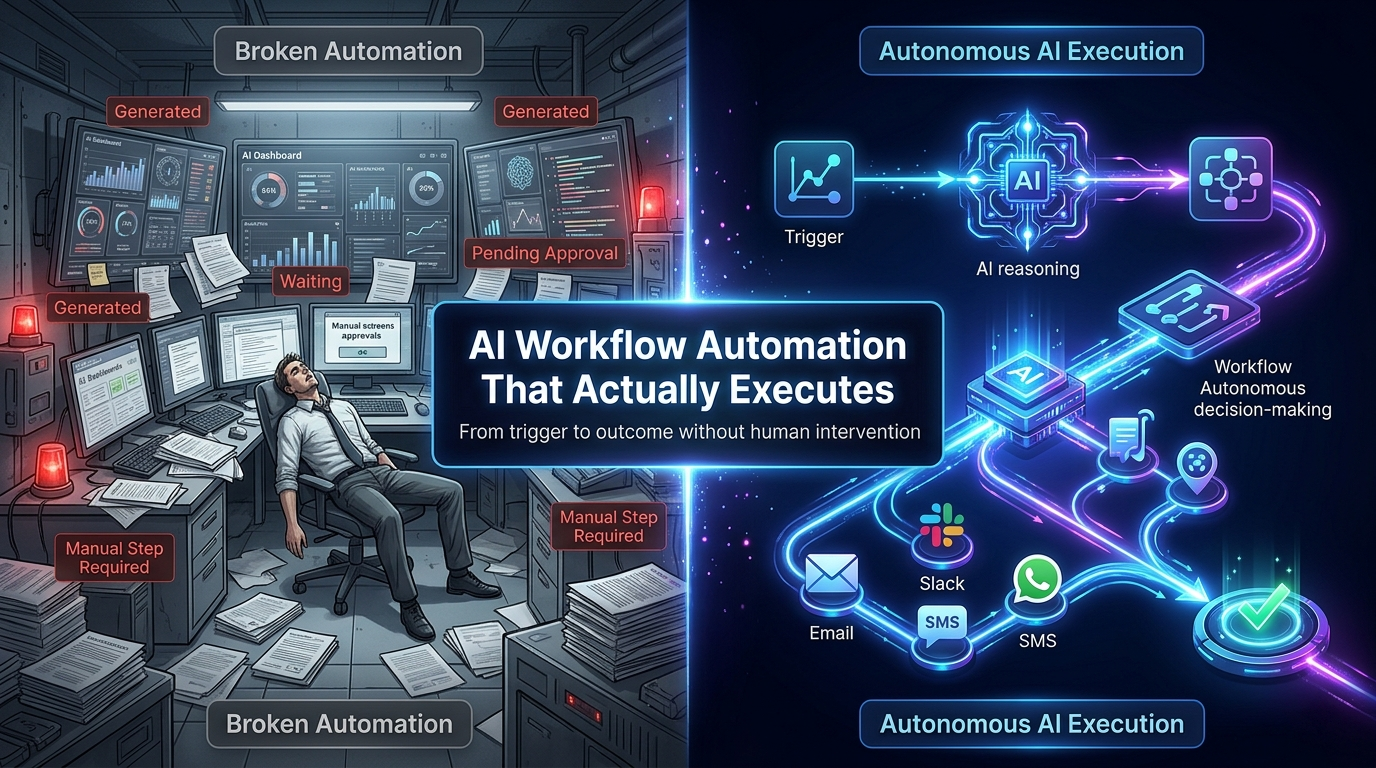
Most AI tools stop too early.
They generate. They produce. They output. Then they wait for a human to do something with the result.
That is not automation. That is a faster way to create more work.
True AI workflow automation runs from trigger to outcome, autonomously, without human steps in between. The AI doesn’t just write the customer email. It writes it, personalizes it, routes it for approval if needed, and sends it. The loop closes.
This is what Neptune was built to do. And it’s what every MLOps platform, Neptune.ai (shut down), MLflow, and ZenML were never designed for.
What is AI Workflow Automation?
AI workflow automation is the practice of chaining AI models, external APIs, conditional logic, and communication agents into multi-step sequences that execute autonomously from a single trigger.
The keyword is autonomously. Not a human-in-the-loop at every step. Not a dashboard to check. Not a result sitting in a database waiting to be retrieved.
An automated AI workflow:
- Receives a trigger: A user action, a schedule, an API event, or an incoming data signal
- Routes the task: To the optimal AI model via intelligent selection
- Chains multiple AI steps: Each step’s output becomes the next step’s input
- Integrates external APIs: Pulls data from CRMs, databases, or third-party services as needed
- Applies conditional logic: Different paths execute based on AI outputs or data values
- Delivers outcomes: Communication agents send results via email, SMS, WhatsApp, Slack, or webhooks
- Logs execution: Full audit trail for compliance, debugging, and optimization
From trigger to delivery, with no human steps required between the first and last.
Why Most AI Automation Stops Too Early
The AI tooling market in 2026 falls into two camps that both stop short of true end-to-end automation:
Camp 1: MLOps and Experiment Tracking Platforms
Platforms like MLflow and ZenML (and the now-shut-down neptune.ai) are built for ML research and infrastructure. They track experiments, manage model versions, and orchestrate ML pipelines on Kubernetes and Airflow.
These are powerful tools for team training models. But they are not AI workflow automation platforms. They do not route tasks across multiple LLMs. They do not chain GPT-4 outputs into Claude analysis steps. They do not have communication agents. They were not built for the era of production LLM applications.
The Sumble data confirms this: neptune.ai’s users were almost exclusively MLOps Engineers, ML Engineers, and Data Scientists. Not the marketing teams, e-commerce operators, or SaaS builders who need workflow automation today.
Camp 2: General Automation Platforms
Zapier, Make.com, and similar tools connect apps and trigger actions based on events. They are excellent at what they do, moving data between systems and triggering notifications.
But they are not AI-native. AI is a feature added to an automation foundation. When these platforms route a task to an AI model, they send it to one model with a fixed prompt. There is no intelligent model selection. There is no multi-step AI chaining. There is no semantic routing.
The ZenML blog comparison makes an important distinction: neptune.ai was an MLOps tool, not an automation platform. The same distinction applies here: Zapier is an automation platform, not an AI orchestration one.
| Platform | Built For | AI-Native? | Multi-Model? | Communication Agents? |
| neptune.ai (shutdown) | ML experiment tracking | No | No | No |
| MLflow | ML lifecycle management | No | No | No |
| ZenML | ML pipeline orchestration | Partial | No | No |
| Zapier / Make.com | App automation | Partial (bolt-on) | No | Partial (templated) |
| LangChain | LLM app development | Yes | Partial | No |
| Neptune (neptuneai.live) | AI workflow automation | Yes | Yes | Yes, native |
Neptune occupies the position none of these platforms hold: AI-native workflow automation with intelligent multi-model routing and built-in communication agents.
Neptune’s Workflow Toolchains: How Multi-Step AI Chaining Works
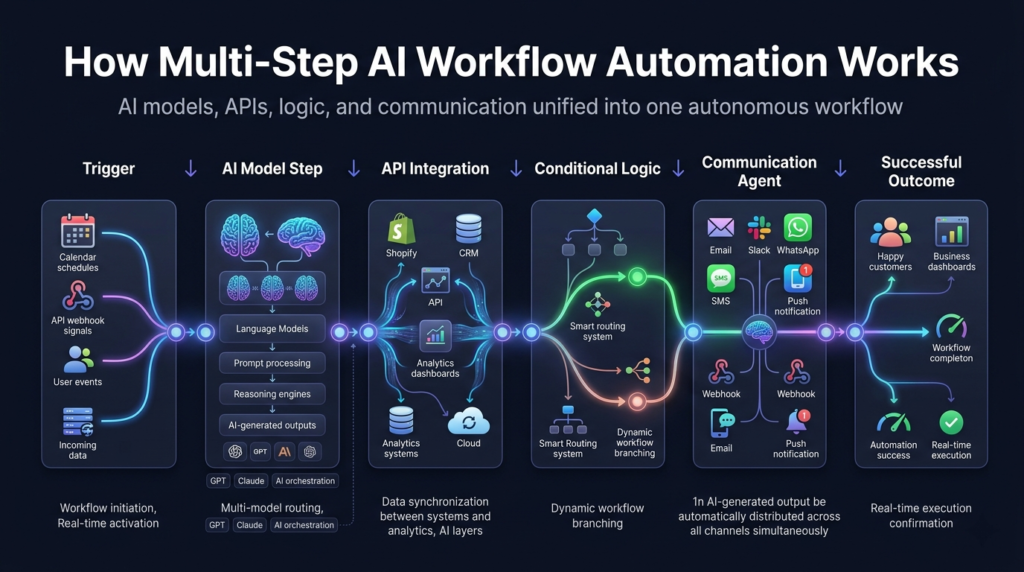
A workflow in Neptune is a directed sequence of steps. Each step receives inputs, executes a function, and passes outputs to the next step. The functions available at each step are:
AI Model Step
Sends a prompt and context to an AI model and captures the output. The model is selected automatically by Neptune’s Meta-AI router based on task type, cost, latency, and quality requirements, or pinned to a specific model if needed.
Multiple AI steps can be chained: step 1 generates a draft, step 2 reviews it with a different model, and step 3 refines based on the review. Each step uses the most appropriate model for its function.
API Integration Step
Calls an external API, a CRM, a database, an analytics platform, or any service with an HTTP endpoint. API responses are available to downstream steps, enabling workflows that incorporate real-world data alongside AI reasoning.
Example: a workflow that pulls customer purchase history from Shopify, passes it to an AI model for personalization, then delivers the personalized message via a communication agent.
Conditional Logic Step
Evaluates conditions based on workflow data and routes execution to different branches. Conditions can be based on AI outputs (sentiment score above threshold), data values (order value above X), or API responses (customer tier).
This is what gives AI workflows decision-making capability; they don’t just execute linearly, they adapt based on what they find.
Communication Agent Step
Delivers workflow outputs via email, SMS, WhatsApp, Slack, webhook, or push notification. Can be placed at any point in the workflow, or at multiple points for parallel delivery. Full access to all upstream step outputs for dynamic content composition.
Transform Step
Processes, formats, or restructures data between steps. Converts AI outputs to structured formats for downstream API calls, aggregates data from multiple API responses, or applies business logic before communication.
Real Workflow Examples by Vertical
Abstract workflow architecture is useful. Concrete examples are more useful. Here are production AI workflow automation examples by industry:
E-commerce: Abandoned Cart Recovery
- Trigger: Cart abandoned for 30 minutes
- Step 1 (API): Pull cart contents, customer profile, and purchase history from Shopify
- Step 2 (AI Model — GPT-4o-mini): Analyze cart and customer data, generate personalized recovery message with relevant product highlights
- Step 3 (Conditional): If cart value > $100, add discount code to message
- Step 4 (Communication Agent): Send email within 35 minutes of abandonment, WhatsApp follow-up at 24 hours if no open
- Result: Autonomous recovery workflow running 24/7, zero human involvement
Marketing Agency: Weekly Client Reporting
- Trigger: Every Monday at 7:00 AM
- Step 1 (API): Pull campaign performance data from Google Ads, Meta Ads, and analytics platform
- Step 2 (AI Model — Claude): Analyze performance data, identify key trends, and generate narrative insights in the client’s preferred reporting style
- Step 3 (AI Model — GPT-4o-mini): Format insights into executive summary and detailed breakdowns
- Step 4 (Communication Agent): Email full report to client + Slack summary to internal account team
- Result: 8 client reports delivered autonomously every Monday, saving 6+ hours of analyst time weekly
SaaS: User Onboarding Sequence
- Trigger: New user signs up
- Step 1 (API): Pull user profile, plan type, and referral source
- Step 2 (AI Model — Claude Haiku): Generate personalized Day 1 email based on user segment and referral context
- Step 3 (Communication Agent): Send Day 1 email
- Step 4 (Conditional — Day 3): If the user has not completed the key activation step, generate a re-engagement message; if completed, generate an advancement email
- Step 5 (Communication Agent): Send Day 3 email (personalized to activation status)
- Result: every user receives a personalized onboarding journey with zero manual work from the product team
Creator Economy: Content Pipeline
- Trigger: Content brief submitted
- Step 1 (AI Model — GPT-4): Generate a detailed outline from a brief
- Step 2 (AI Model — Claude): Write a full draft from the outline
- Step 3 (AI Model — GPT-4o-mini): Generate SEO metadata, title, meta description, keywords
- Step 4 (Communication Agent — Slack): Post draft + metadata to #content-review channel for human review
- Step 5 (Conditional): If approved (Slack reaction), trigger publication webhook; if changes are requested, re-run from Step 2 with feedback
- Result: Content production time reduced by 70%, with human review preserved at the right checkpoint
Neptune vs Zapier AI vs Make.com vs LangChain, Honest Comparison
| Capability | Neptune | Zapier AI | Make.com | LangChain |
| Multi-model intelligent routing | Yes, native | No | No | Partial, manual |
| Multi-step AI chaining | Yes, native | Limited | Limited | Yes, framework |
| Conditional workflow logic | Yes | Yes | Yes | Yes, code |
| Communication agents (email/SMS/WhatsApp/Slack) | Yes, all native | Partial, Zaps | Partial, modules | No, build yourself |
| External API integration | Yes | Yes (8,000+ apps) | Yes (3,000+ apps) | Yes, code |
| Managed infrastructure | Yes | Yes | Yes | No, self-hosted |
| Non-developer access | Yes | Yes | Yes | No |
| Vertical workflow templates | Yes, 5 verticals | Yes, horizontal | Yes, horizontal | No |
| AI spend optimization | Ye,30-70% savings | No | No | No |
| Pricing start | $15/month | $19.99/month | $9/month | Free (infra cost) |
Neptune wins on AI-native capabilities. Zapier and Make.com win on breadth of app integrations. If your workflow is primarily moving data between non-AI SaaS tools, they are the better choice. LangChain wins on customization depth. If you have strong engineering resources and need maximum control, it is the most flexible option.
The Creator Marketplace: Buy, Sell, and Share AI Workflows
Neptune’s platform includes a creator marketplace where users can publish, discover, and deploy pre-built workflow templates.
For teams adopting AI workflow automation, the marketplace significantly reduces time-to-value:
- Browse pre-built workflows for your industry and use case, e-commerce, marketing, SaaS, gaming, and creator economy
- Deploy a template in minutes, configure your API keys, communication channels, and workflow parameters
- Customize from a working baseline, modify an existing workflow rather than building from scratch
- Publish your own workflows, share workflows you’ve built, and earn revenue from the marketplace
The marketplace creates a compounding advantage: as more users build and publish specialized workflows, the platform becomes more valuable for every subsequent team that adopts it.
Frequently Asked Questions
What is AI workflow automation?
AI workflow automation is the practice of chaining AI models, APIs, conditional logic, and communication agents into multi-step sequences that execute autonomously from a trigger to an outcome. The workflow runs without human steps between trigger and delivery.
How is Neptune different from Zapier for AI workflows?
Zapier automates tasks between apps with AI as a bolt-on feature. Neptune is AI-native, built from the ground up for multi-model routing, multi-step AI chaining, and autonomous communication. Zapier routes one task to one AI model per Zap. Neptune intelligently routes across multiple models, chains steps with full context passing, and delivers outcomes via built-in communication agents.
Do I need to know how to code to use Neptune?
No. Neptune’s workflow builder is designed for non-developers. The marketplace provides pre-built templates that can be deployed with configuration only. For teams who want to build custom workflows programmatically, Neptune also offers a full API and workflow-as-code capability.
Can Neptune integrate with my existing tools?
Yes. Neptune’s API integration step connects to any service with an HTTP endpoint, CRMs like Salesforce and HubSpot, e-commerce platforms like Shopify, analytics tools like Google Analytics, and any custom internal API. Native integrations for the most common platforms are available out of the box.
How does Neptune handle workflow errors?
Neptune’s workflow engine includes automatic retry logic, configurable error handling branches, and alert delivery via communication agents when a workflow step fails. Full execution logs are available for debugging. Fallback model chains ensure AI step failures are handled without breaking the workflow.
What is the difference between AI workflow automation and RPA?
Robotic Process Automation (RPA) automates rule-based, repetitive tasks by mimicking user interactions with existing software. AI workflow automation uses language models and AI reasoning to handle tasks that require judgment, content generation, and adaptive decision-making. The two approaches are complementary; RPA handles structured process execution, and AI workflow automation handles unstructured, reasoning-heavy tasks.
Getting Started with AI Workflow Automation on Neptune
The fastest way to experience AI workflow automation is to deploy a pre-built template from Neptune’s marketplace and run it with your own data.
- Create your account at NeptuneAI.live: Free tier, 1,000 credits included, no credit card required
- Browse the marketplace and find: A workflow template for your industry
- Connect your AI provider API keys: OpenAI, Anthropic, Google, or others
- Configure your communication channels: Email, SMS, WhatsApp, Slack, or webhook
- Set your trigger: Schedule, webhook, or manual
- Run your first workflow and review the execution log
For teams that want to build from scratch: Neptune’s workflow builder walks you through adding steps, configuring routing preferences, and setting up communication agents. Most teams have their first custom workflow running within an afternoon.
Start automating at NeptuneAI.live, free tier, no credit card required.