

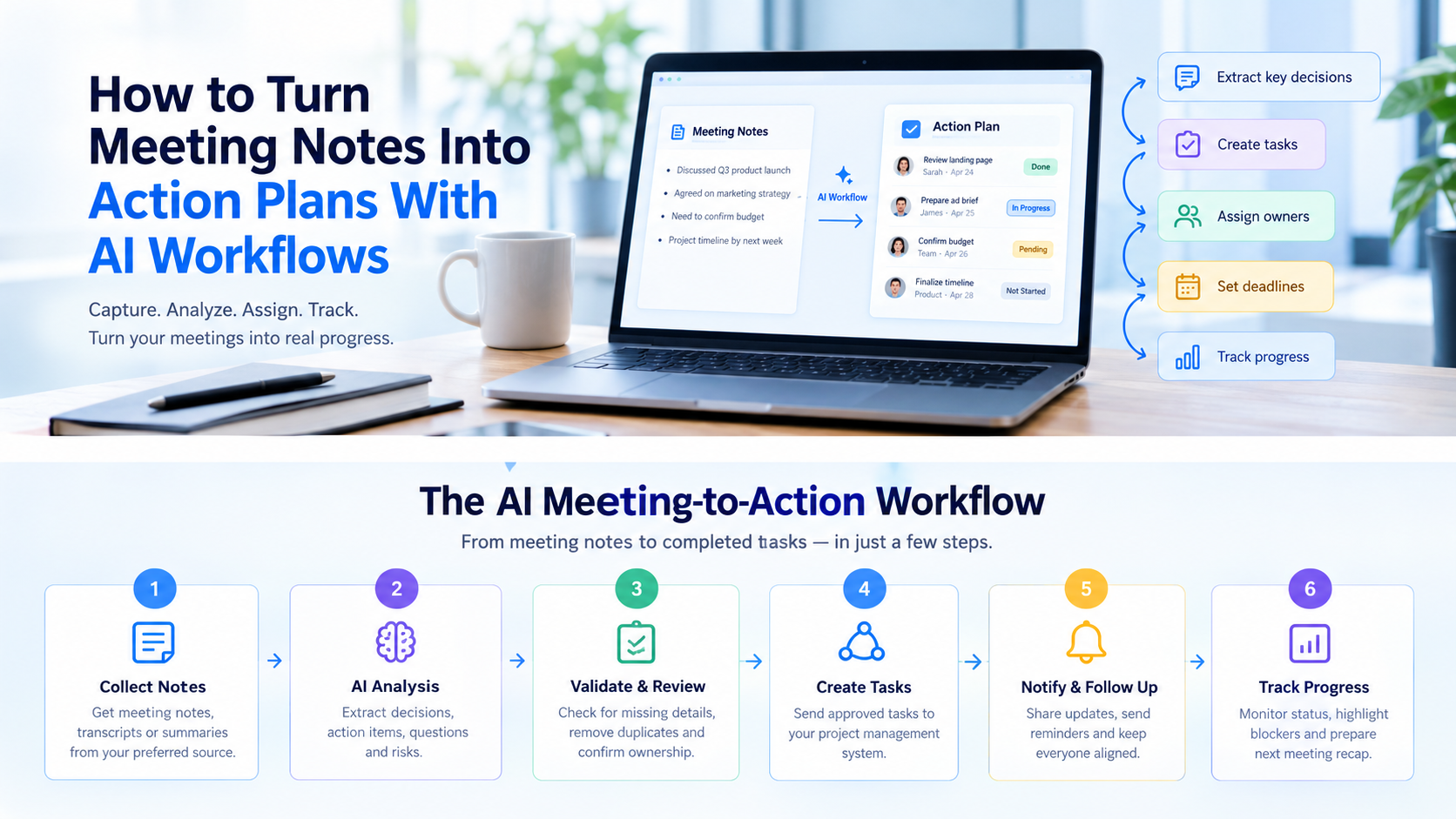
Meetings generate ideas, decisions, and important commitments. However, many teams struggle to turn those discussions into completed tasks. Notes are saved, follow-up emails are delayed, and team members may leave without knowing who is responsible for the next step.
AI workflows can help solve this problem. They can organize meeting notes, identify decisions, extract action items, prepare task lists, and support follow-up automation.
The key is to go beyond a simple meeting summary. A useful workflow should turn the discussion into clear tasks with owners, deadlines, and measurable outcomes.
In this guide, you will learn how to turn meeting notes into action plans with AI workflows, which steps to automate, which details require human review, and how to build a repeatable process for your team.
Table of Contents
- What Is an AI Meeting-to-Action Workflow?
- Why Meeting Notes Often Fail to Produce Results
- How to Turn Meeting Notes Into Action Plans With AI Workflows
- A Practical Example of an AI Meeting Workflow
- The Best AI Prompt for Turning Meeting Notes Into Tasks
- How to Automate Meeting Follow-Ups
- Common Mistakes to Avoid
- How to Measure the Success of Your AI Workflow
- Frequently Asked Questions
- Final Thoughts
What Is an AI Meeting-to-Action Workflow?
An AI meeting-to-action workflow is a process that converts meeting notes or transcripts into organized, trackable tasks.
Instead of asking someone to review an entire transcript and manually create a task list, you use AI to identify important information and prepare the next steps.
A typical workflow includes:
- Meeting notes: The original notes, transcript, or discussion summary.
- Decision extraction: A record of what the team agreed to do.
- Action items: Specific tasks that need to be completed.
- Task assignment: A responsible person for each action.
- Deadline management: Due dates based on confirmed commitments.
- Follow-up automation: Reminders, task updates, and progress reports.
For example, a project manager might finish a meeting with 30 minutes of notes. An AI workflow can organize the main decisions, extract potential tasks, flag missing details, and prepare a structured action plan for review.
The team can then approve the plan and send the tasks to its existing project management system.
Why Meeting Notes Often Fail to Produce Results
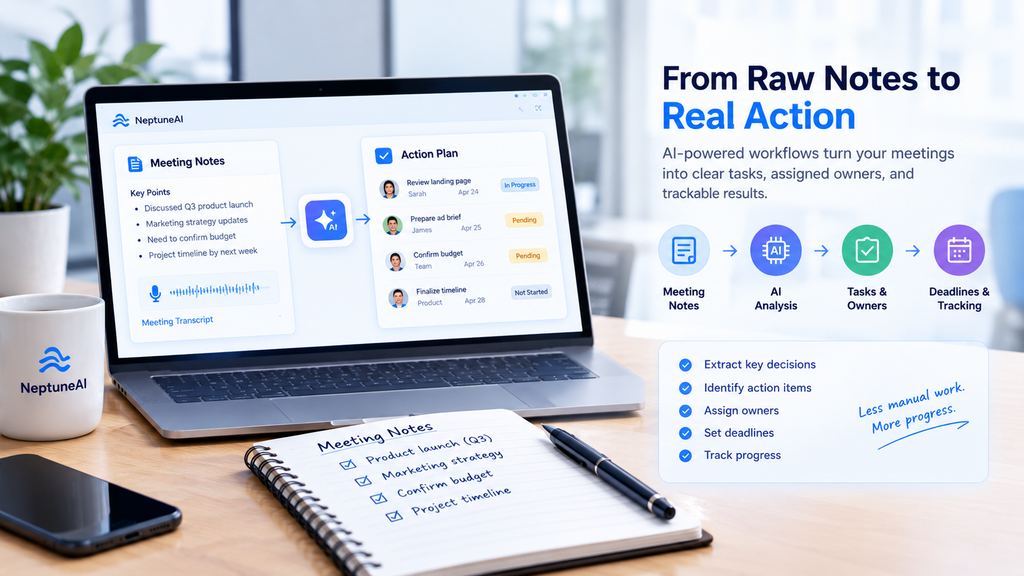
Taking notes is only the first step. The real challenge is making sure that everyone understands what happens next.
Several common problems can prevent teams from acting on meeting outcomes.
1. Tasks Are Not Clearly Defined
A note such as “improve the website” does not explain what needs to change or when the work should be completed.
AI can help turn broad discussion points into specific proposed tasks. For example, “review the homepage headline and submit three alternatives” gives the team a clearer starting point.
2. No One Owns the Next Step
When several people discuss a task without assigning responsibility, the work can remain unfinished.
An AI workflow should identify the person explicitly assigned to each action. If the meeting does not establish an owner, the workflow should flag the task for confirmation rather than guess.
3. Deadlines Are Missing
Words such as “soon” and “next week” can create confusion. Teams need clear deadlines to plan their work.
AI can identify dates mentioned in meeting notes and convert relative dates into calendar dates when the meeting date and intended meaning are clear.
4. Follow-Ups Depend on Manual Work
Someone must often copy tasks into another application, send reminders, and update the team.
A connected workflow can reduce these repetitive steps. It can prepare task records, request approval, and send notifications after the tasks are confirmed.
How to Turn Meeting Notes Into Action Plans With AI Workflows
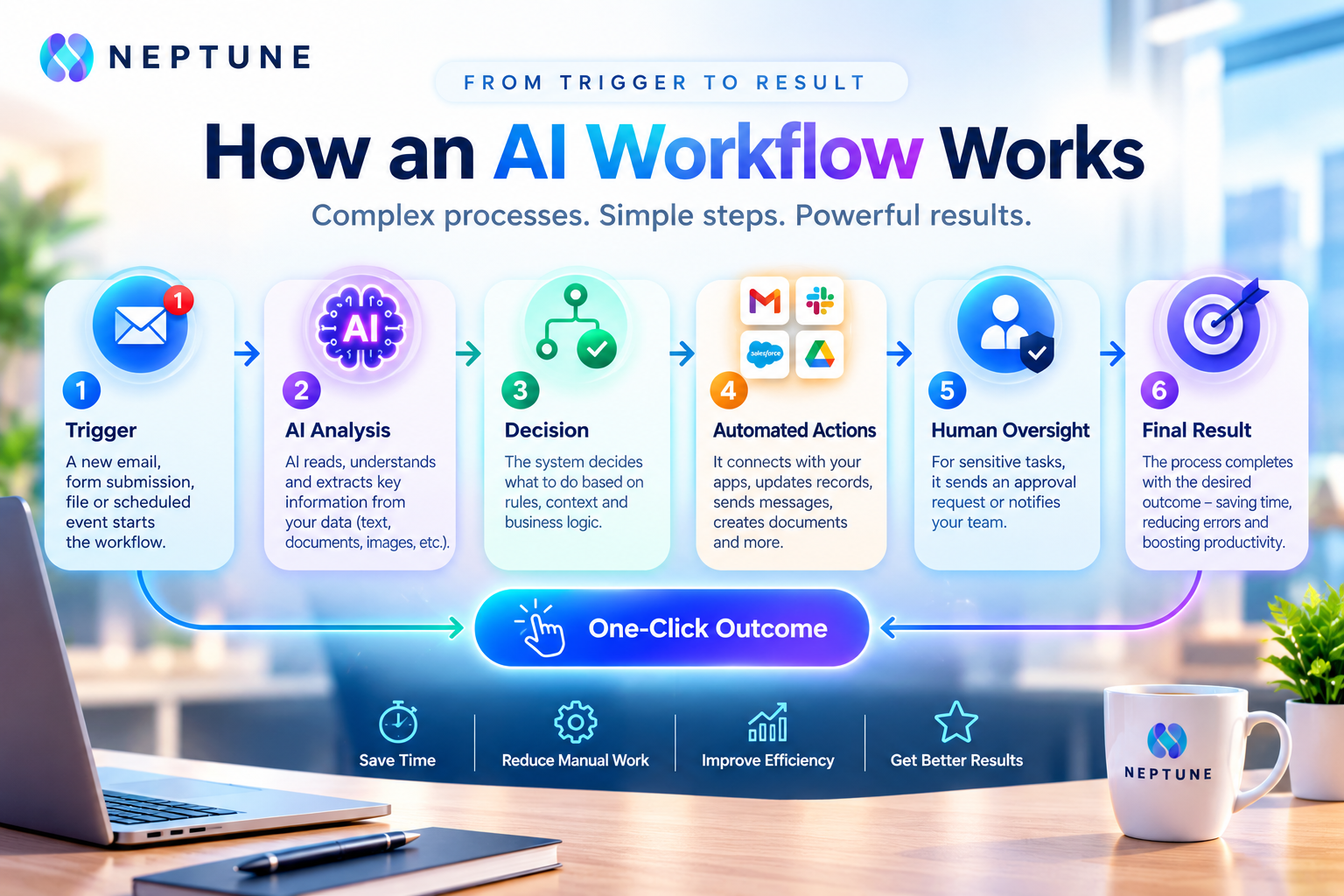
The most effective approach uses a series of connected steps. Each stage prepares information for the next one, helping the team move from discussion to execution.
Step 1: Collect Meeting Notes or Transcripts
Start with the information captured during the meeting.
This may include manually written notes, an approved meeting transcript, a summary from a meeting assistant, or a document containing decisions and discussion points.
Provide useful context, such as the meeting date, project name, participants, and main objective. This helps AI interpret the notes more accurately.
Before processing a recording or transcript, follow the relevant consent, privacy, and company policies.
Step 2: Use AI to Identify Decisions and Action Items
Ask AI to separate the discussion into distinct categories.
These should include:
- Confirmed decisions.
- Agreed action items.
- Unresolved questions.
- Risks or blockers.
- Ideas that still need approval.
This distinction matters because not every suggestion made during a meeting becomes a commitment.
For example, “We could launch a referral campaign” is an idea. “Sarah will prepare the referral campaign proposal by Thursday” is a potential action item with an owner and deadline.
AI should preserve this difference instead of turning every discussion point into a task.
Step 3: Create a Structured Action Plan
Once the action items have been extracted, organize them into a consistent format.
| Task | Owner | Deadline | Status |
|---|---|---|---|
| Review the landing page | Sarah | Thursday | Pending |
| Prepare the campaign brief | James | Friday | Pending |
| Confirm the advertising budget | Not assigned | Needs confirmation | Blocked |
These are illustrative examples. In an actual workflow, owners and deadlines should come from confirmed meeting details.
A useful action plan should make each task easy to understand and complete. Use clear verbs, include relevant context, and identify dependencies when one task must happen before another.
Step 4: Review and Approve the Proposed Tasks
Human review is an important part of a reliable AI workflow.
AI may misunderstand a speaker, confuse an idea with a commitment, or interpret a vague deadline incorrectly. A short approval step helps prevent those errors from reaching the team’s task manager.
Review the following details:
- Is the task based on something actually agreed?
- Is the assigned owner correct?
- Is the deadline confirmed?
- Are duplicate tasks present?
- Does the task contain enough context?
- Is any approval or dependency still missing?
Mark uncertain items for clarification. Do not allow the workflow to invent missing details simply to complete every field.
Step 5: Send Approved Tasks to Your Project Management System
After approval, the workflow can prepare or create tasks in the system your team already uses.
Depending on available integrations, this may include tools such as Asana, Trello, ClickUp, Notion, or Jira.
Each task should include its description, owner, deadline, priority, and source meeting where appropriate.
The purpose is to keep the work in one place rather than create another document that people must remember to check.
If a direct integration is unavailable, the workflow can prepare a structured task list for manual import or review.
Step 6: Automate Notifications and Reminders
Once tasks are confirmed, the workflow can help communicate responsibilities.
For example, it may prepare a meeting recap, notify the assigned team members, or schedule reminders for approaching deadlines.
A useful follow-up message should include the task, the responsible person, the due date, and any important context.
Avoid sending repeated or unnecessary notifications. Reminders should support the team’s working process rather than create more noise.
Step 7: Track Progress and Close the Loop
A meeting-to-action workflow should not stop after creating tasks.
Track whether tasks are pending, in progress, blocked, or completed. Before the next meeting, generate a short progress report that highlights overdue work, unresolved questions, and decisions that need further discussion.
The team can then begin the next meeting by reviewing the previous action plan.
This final step connects each meeting to the work that follows, helping teams maintain accountability over time.
A Practical Example of an AI Meeting Workflow
Consider a marketing team that meets to plan a new product launch.
The team discusses website updates, advertising materials, and the campaign launch date. The meeting notes contain several decisions, but the responsibilities are mixed into the discussion.
Here is how an AI workflow could organize the information.
Original meeting notes:
- Sarah will review the landing page by Thursday.
- James will prepare the advertising brief by Friday.
- The team needs to confirm the campaign budget.
- The launch date depends on final approval.
Proposed AI output:
| Type | Result |
|---|---|
| Decision | The team is preparing for a product launch. |
| Action | Sarah reviews the landing page by Thursday. |
| Action | James prepares the advertising brief by Friday. |
| Open question | Who will confirm the campaign budget? |
| Dependency | Confirm the launch date after final approval. |
The workflow can then prepare the two assigned tasks, flag the missing budget owner, and identify the launch date as dependent on approval.
After a team member reviews the output, approved tasks can move into the project management system.
The team does not need to manually rewrite every note. It only needs to check the proposed actions and resolve the missing information.
The Best AI Prompt for Turning Meeting Notes Into Tasks
A well-defined prompt helps AI return consistent results. It should specify the expected fields and explain how to handle missing information.
You can use the following reusable prompt with a compatible AI assistant.
Copy-ready prompt:
Act as a meeting action-plan assistant. Analyze the meeting notes below and convert them into a structured action plan.
Separate the output into:
- Key decisions.
- Confirmed action items.
- Open questions.
- Risks and blockers.
- Required follow-ups.
For every action item, include:
- A clear task description starting with an action verb.
- The responsible owner, if explicitly identified.
- The confirmed deadline, if available.
- Priority, when supported by the meeting context.
- Dependencies or blockers.
- The original statement that supports the task.
Do not invent owners, deadlines, decisions, or commitments. If information is missing, mark it as “Needs confirmation.” Separate suggestions from agreed actions, remove duplicate tasks, and flag conflicting information.
Finish with a concise follow-up email draft and a checklist of items that require human approval.
Meeting date: [Insert date]
Project name: [Insert project name]
Meeting notes: [Paste notes or transcript]
This prompt provides a consistent starting point. Teams can adapt the output to their preferred task format and add any project-specific rules.
For automated workflows, structured output such as JSON can also help compatible integrations map task fields into other applications.
How to Automate Meeting Follow-Ups
Manual prompting is useful for occasional meetings. However, teams that hold frequent meetings may benefit from connecting the entire process into an AI workflow.
A practical automation sequence looks like this:
Meeting notes → AI extraction → Task validation → Human approval → Task creation → Notifications → Progress tracking
Each stage has a defined purpose.
Choose the Right Workflow Components
A complete setup may use:
- Input source: Meeting notes, an approved transcript, or a shared document.
- AI processing: Extract decisions, tasks, owners, and deadlines.
- Validation: Check required fields and flag uncertain information.
- Task destination: Send approved work to the team’s project management system.
- Communication: Prepare follow-up messages or reminders.
- Monitoring: Check task status and identify unresolved work.
Not every team needs a complex system. A small team may begin with an AI assistant and a task tracker. Larger teams may need integrations, approval rules, access controls, and error monitoring.
Where NeptuneAI Fits Into the Process
NeptuneAI describes its platform as an orchestration layer that connects AI models, APIs, workflow logic, and communication agents. These capabilities are relevant to designing workflows that coordinate multiple processing and communication steps. <Link url=”https://neptuneai.live/” title=”Explore NeptuneAI”/>.
For a meeting-to-action use case, a workflow could be designed to process meeting notes, use an AI model to identify proposed tasks, validate required fields, and prepare approved information for connected systems.
The exact level of automation depends on the integrations and workflow components available for the implementation. Task creation, notifications, and progress updates should only be described as automated when the required connections and permissions are configured.
The goal is to build a process that fits the team’s needs, reduces repetitive work, and keeps people responsible for important decisions.
Common Mistakes to Avoid
Even a well-designed AI workflow can produce poor results if its rules are unclear.
Turning Every Idea Into a Task
Brainstorming often includes possibilities that nobody has agreed to pursue. Keep suggestions separate from confirmed commitments.
Allowing AI to Guess Missing Details
A task with an invented owner or deadline can create confusion. Flag missing fields for review instead.
Skipping Human Approval
Automatically sending every extracted action into a task manager can create duplicates and incorrect assignments. Use an approval step where tasks affect real responsibilities or deadlines.
Ignoring Privacy and Access Controls
Meeting notes may contain customer details, internal plans, or confidential information. Use approved tools, restrict access, and follow your organization’s data policies.
Creating Tasks Without Tracking Completion
A task list is only useful when the team can monitor progress. Include status tracking and a regular review process.
Automating Too Much Too Early
Start with one recurring meeting type, test the workflow, and fix common errors before extending it across the organization.
How to Measure the Success of Your AI Workflow
A workflow should be judged by its effect on the team’s work, not simply by how many tasks it generates.
Track a few useful measures before and after implementation.
| Metric | What It Measures |
|---|---|
| Time to create an action plan | How long post-meeting processing takes |
| Task assignment completeness | The share of approved tasks with confirmed owners |
| Deadline completeness | The share of applicable tasks with confirmed due dates |
| Correction rate | How often the AI-generated output needs changes |
| On-time completion | The share of tasks completed by their deadlines |
| Follow-up time | How quickly approved decisions reach the team |
Establish a baseline before making claims about improvement. Review the results regularly and adjust prompts, validation rules, and integrations as needed.
The best workflow is one that makes follow-through more reliable without adding unnecessary steps.
Frequently Asked Questions
Provide AI with meeting notes or a transcript and ask it to separate decisions, confirmed tasks, and open questions. Require an owner and deadline where available, flag missing details, review the output, and transfer approved tasks into your project management system.
AI can extract explicitly stated owners and prepare task assignments. Automatic task creation may be possible when compatible integrations are configured. However, ambiguous responsibilities should be reviewed instead of assigned through guesswork.
A useful plan includes the task description, responsible owner, deadline, priority when relevant, dependencies, status, and a reference to the original decision or meeting notes.
Yes. You can provide manually written notes, bullet points, or a meeting summary. The quality of the output depends on the information available, so unclear or missing details should remain flagged for confirmation.
A workflow may combine an AI assistant, a meeting transcription or note-taking tool, a task manager, and a communication platform. The right combination depends on the team’s existing software and the integrations available.
They can reduce manual summarization, task extraction, data entry, and follow-up preparation. The actual time saved depends on meeting volume, the quality of the notes, and how much of the workflow is successfully automated.
Human review is recommended before uncertain or consequential tasks are assigned or published. AI can make mistakes when interpreting speakers, deadlines, or tentative suggestions. Approval helps protect the accuracy of the action plan.
Start with a repeatable process for collecting notes, extracting actions, validating details, and creating tasks. Then add integrations, notifications, monitoring, and reporting as needed. Test each stage before expanding the workflow to more teams.
Final Thoughts
Turning meeting notes into action plans with AI workflows helps teams move beyond summaries and focus on execution. AI can organize discussions, identify potential tasks, prepare follow-ups, and reduce repetitive administrative work.
The most effective process combines structured prompts, clear ownership, confirmed deadlines, human review, and reliable progress tracking. Automation should make responsibilities easier to understand, not create more tasks or uncertainty.
Start with one recurring meeting, test the process, and improve it based on real results. As the workflow becomes reliable, connect the steps that offer the most value to your team.
Ready to explore AI-powered workflow automation? Visit NeptuneAI to learn how AI models, APIs, and connected workflows can help businesses streamline complex processes and turn ideas into actionable outcomes.